
The Receipt That Never Made It Back
It is a Tuesday. A maintenance tech runs to Home Depot for a part, grabs towels and a plunger at Walmart on the way back, and picks up propane for a grill at a third stop. Three receipts, three properties, one afternoon. By the end of the month, two of them are gone.
You know the rest of the week too. Card charges sitting in the books with nothing attached. A bookkeeper texting the field team, "did you keep that receipt?" A photo that came in too blurry to read. An expense nobody can quite explain, holding up the close.
Riley Goldman, CEO of Beachside VR, remembers doing it the hard way. "I would literally print out my credit card statement, and I would go through each line one by one. I'd call every single one of my people and say, what is this receipt for? What did we buy? Which cleaning supplies should be billed to this unit?" At thirty units, that is a long afternoon. At three hundred, it is someone's entire week.
Here is the part worth saying out loud, this is not a discipline problem with your team. It is a tooling problem. Receipt tracking for short-term rental property managers has to work the way field teams actually work, out in the world, on their phones, in the moment.
Why Short-Term Rental Receipts Get Lost in the First Place
Your Field Team Can't Keep Every Paper Receipt
The people spending are rarely the people doing the books. Cleaners, maintenance techs, and property managers are out at Walmart, Home Depot, and Lowes all day. A paper receipt has to survive a truck, a pocket, and a few weeks before anyone records it, and plenty of them do not.
So teams build workarounds, and the workarounds are all manual. A shared Google Drive with a folder for every property. A spreadsheet on top of that. Then someone re-keys every line into the PMS (Streamline, Guesty, Track, Hostaway, Hostfully, Hospitable, OwnerRez) and into the accounting software (QuickBooks, Sage Intacct, Netsuite) by hand.
As one operator put it, a lot of things are done manually that really should not be.
The texted photos become their own pile. Receipts arrive as blurry images, sometimes with a note attached, "this one splits across these three properties," and someone matches each photo to a card charge by hand until it stops feeling sane.
What One Lost Receipt Actually Costs You
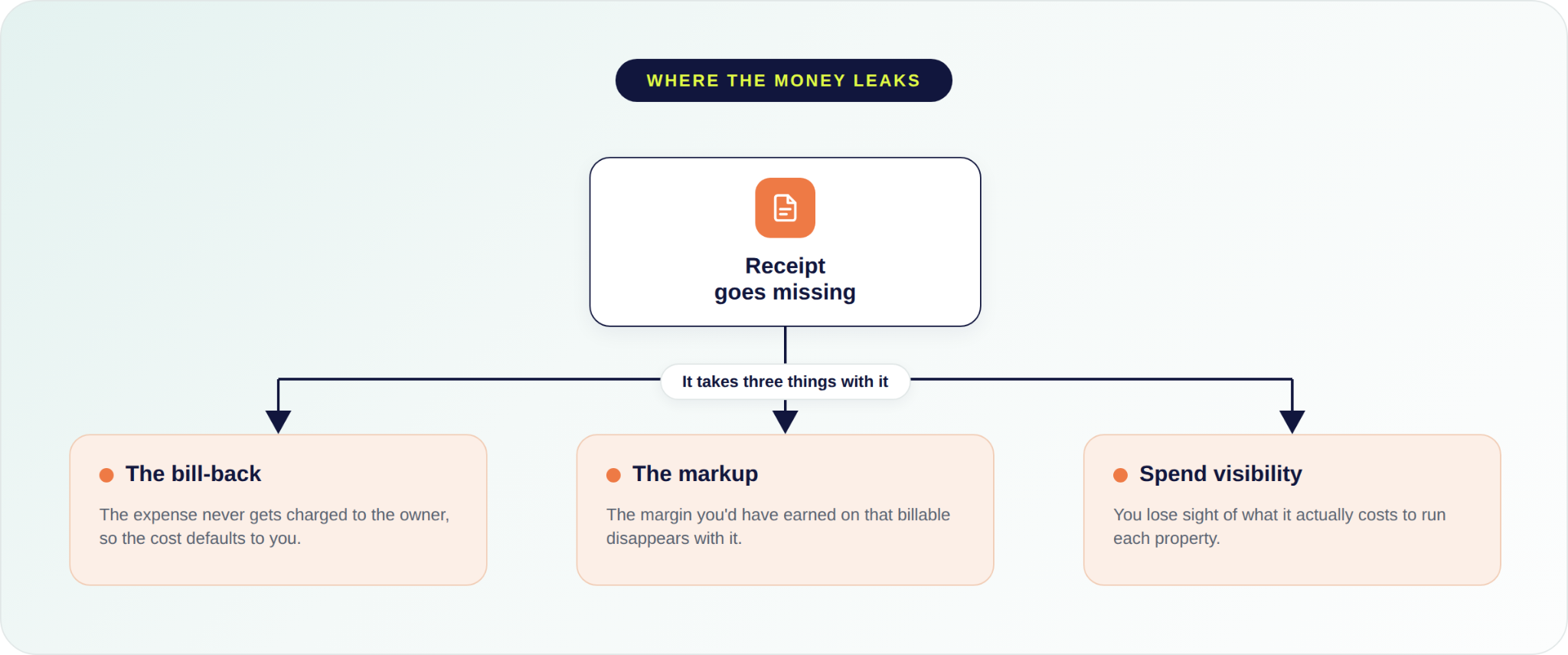
In short-term rental, some costs are yours to absorb and many of them are owner-billable. The receipt is what tells the two apart. Lose it, and you have not just misplaced a piece of paper. You have lost the ability to decide what that expense even is.
A documented owner-billable expense is a decision you get to make. Bill it back at cost, or apply your markup and earn a margin on it. With no proof, you never get to make that call. The cost quietly defaults to you, and the markup you would have earned disappears with it.
It compounds in a direction most operators never see. When receipts are not flowing in, you also lose sight of what it actually costs to run each property. So you lose the billback, you lose the markup, and you lose the visibility into your own spend, all at once.
Heather Gunther, Bookkeeper at Coastal Vibe Vacations, names the part most teams feel but rarely measure. "We knew that we were leaving money on the table, that there were receipts that were missing and expenses that we never got an answer for and weren't able to then charge our owners." The leak is not the spending. It is the receipts that never make it into the system.
Short-term rental property managers do not need a better filing habit. They need a simple way to capture the receipt at the point of sale and let the person who paid add the details right then, so nothing has to be reconstructed at month-end.
How Topkey Receipt Automations Actually Works
Topkey's receipt automations close that gap as one loop with two sides. On one side, the field team captures the receipt at the point of sale. On the other, the accounting team gets receipts that match to the right transaction and sync where they belong, with the coding assisted along the way. The result is a simpler receipt process for the people making purchases and the accounting team responsible for the books.
What the Field Team Does at the Point of Sale
SMS-Triggered Mobile Receipt Capture
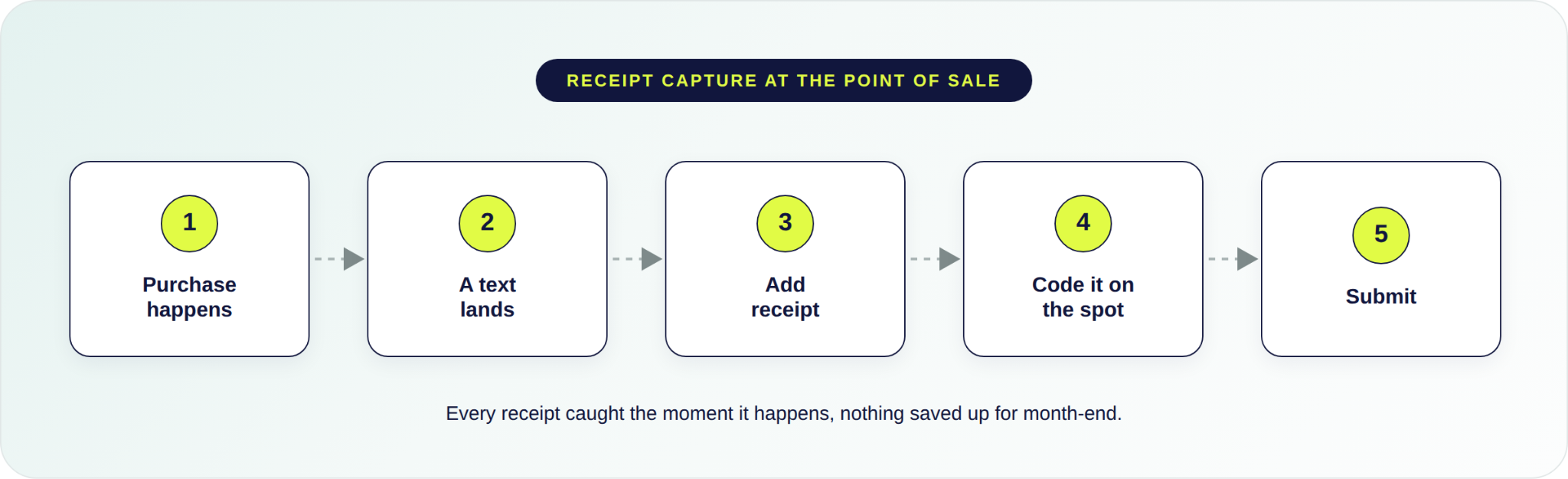
For many operators, the simplest way to capture receipts is right at the point of purchase. Topkey can send the cardholder a text shortly after a purchase with a link straight to that transaction on their phone.
They photograph the receipt right there in the parking lot, and it attaches to the purchase. No shoebox, no folder to keep, no paper to hold onto. The record is made, and the receipt itself can go in the trash.
For the field team, that is less to do, not more. Nobody hunts them down at month-end for a receipt from three weeks ago, because it was handled on the spot. As Jed Stevens, Co-Founder of Koloa Kai Vacation Rentals, puts it, "Topkey is removing obstacles for the people on the ground to get their job done." A receipt capture tool lives or dies on whether the field team will actually use it, and this one asks them to do less.
Often they have their own reason to keep up with it. On some maintenance teams, techs earn bonuses tied to the jobs and dollars that come through, so logging each purchase the moment it happens keeps their own numbers straight. Capturing the receipt is not one more chore. It is how they keep track of what they are owed.
Other Ways Receipts Enter Topkey
Every team handles receipts differently. Topkey gives you multiple ways to capture them, so your team can use the workflow that works best for them.
With email forwarding, cardholders forward receipt emails to their company's dedicated Topkey inbox. Topkey extracts receipt data from email attachments and email body text, then attempts to auto-match the receipt to a transaction using AI.
With Gmail sync, companies can connect a Google Workspace domain to Topkey to automatically monitor designated inboxes for receipt and invoice emails. Matching emails are detected and processed automatically on a recurring sync schedule.
Coding the Expense at the Point of Purchase
The same page holds more than the receipt. Because no two short-term rental operations run the same way, or use the same words for it, your finance team shapes the form to fit. They decide which fields appear and fill them with your own categories and the labels your team already uses. So the details the field person enters come back already in your accounting team's format. Nothing to re-code, nothing to translate at month-end, and no new system to learn. It already speaks your accounting team's language.
The person who paid adds a memo, assigns the property and category, and picks who the expense gets billed to, the owner or your own company. If one receipt covers more than one property or job, they split it into its parts and code each one right there.
That billing choice is the one you never got to make when the receipt went missing. Here it happens at the point of sale, made by the person who actually knows what the purchase was for, not reconstructed weeks later by a bookkeeper guessing from a card statement.
What the Accounting Team Sees When It Syncs
Automated Receipt Matching to Card Transactions
On the accounting side, Topkey's AI reads receipts and matches them to card transactions automatically. It uses details like the merchant, amount, and date, plus the last four digits of the card when available, to identify the right transaction. When it is confident, it attaches the receipt and clears the receipt-required step, so the charge is ready to submit instead of sitting incomplete.
Instead of spending several days manually matching receipts to transactions, the bookkeeper simply reviews and approves the matches Topkey has already made.
Flagging Unmatched Receipts and Incomplete Transactions
When more than one charge could match a receipt, Topkey does not guess. It holds the receipt in the Receipts Inbox and shows the candidate transactions side by side, so someone confirms the right one in a click. That keeps the wrong receipt off the wrong charge.
The same safety net catches the rest. A receipt that looks like a duplicate gets flagged. A document that could be either a receipt or a bill waits for you to classify it. If a forwarded receipt cannot be read at all, the sender gets a heads-up to resend it, so nothing is silently lost. And a transaction still missing anything you require, a receipt, a memo, a property, a category, an accounting field, shows up as incomplete and cannot be submitted until it is filled in.
You decide what counts as complete. Your team sets which fields are required, with a dollar threshold if you only want to enforce them above a certain amount. Matching is automatic when Topkey is sure and a quick human check when it is not, and either way, nothing quietly closes wrong.
It All Syncs Where It Belongs
Topkey pulls your properties and owners from your PMS, whether you run Guesty, Track, Streamline, Hostaway, OwnerRez, Hostfully, Hospitable, or Feather, so every expense is tied to the right property and owner from the start.
Because it was captured and coded at the point of sale, there is no data to re-enter later. Your accounting team confirms the coding in Topkey, then pushes it to your accounting software, whether that is QuickBooks Online, QuickBooks Desktop, Xero, Sage Intacct, or Oracle NetSuite. The owner-billable ones are flagged to bill back to the owner instead of quietly landing on you. Entered once, it moves to your books without anyone re-keying it or bouncing between systems to make the numbers line up.
Aidan Groll, Founder of Blue Gems Management, describes what that feels like downstream. "We no longer have any guesswork on which property an expense is for. There's no disconnect between accounts payable and the actual expense that gets recorded in your owner statement and QuickBooks." The call made back at the point of sale is what makes that true.
What Month-End Looks Like When Receipts Are Tracked and Coded
More Owner-Billable Expenses, Captured and Charged
Put the chain in the right order. Because receipts are captured at the point of sale instead of chased down after the fact, far more owner-billable expenses get documented. And documented expenses get billed to the owners they belong to, including the ones that used to slip through. More captured billables is cash leakage stopped.
And because every expense finally sits in one place, you can see what each property actually costs to run, instead of guessing at month-end.
The teams that tightened this up can measure it. Coastal Vibe Vacations recovered roughly $20,000 a quarter in previously missed owner expenses. Stay on 30a saw its monthly owner billables climb 15%. And Upkey doubled its profit after getting its expense management process tight on Topkey. The money was always theirs to bill. It was just leaking out through lost paper.
An Audit Trail Your Owners and Accountant Can Trust
Because those details are captured at the point of sale, and Topkey can require the receipt, the property, and the code before a transaction is allowed to close, every expense that closes carries its full backup, built as it happened rather than reconstructed under deadline.
So when an owner questions a charge, or the accountant sits down to close the books, the backup is already there. The expense management record becomes the source of truth, not a folder someone has to go dig through. Month-end stops being a receipt hunt and becomes a review.
Faster and Smoother Month-End Close
This is the part that compounds. By the time close comes around, the receipts are attached, the property and category are assigned, and the coding is done. The accountant or bookkeeper is not chasing anyone or keying anything in.
The work that used to belong to the accounting team, the follow-up texts, the receipt hunt, the line-by-line coding, was already handled up front by the person who made the purchase.
The finance seat stops being the collection agency for everyone else's receipts, and month-end shrinks from a reconstruction to a review. It is how Hilton Head Properties Realty & Rentals closes its books 80% faster, and how Host My Home cut five days off its month-end.
The Last Time You Lose a Receipt
Picture that same Tuesday now. At the Home Depot register, a text lands, and the tech photographs the receipt for the part and tags it to the unit before he has stepped away from the counter.
Walking back across the Walmart lot, he does the same with the towels and the plunger. Sitting in the cab after the propane stop, one more. Three purchases, three receipts, each caught the moment it happened, none saved up in a pocket to sort out later. By the end of the month, not one receipt is missing. There is zero cash leakage.
The bigger the purchase, the worse a lost receipt hurts. Danielle Young, GM at KRAIN, had a big one disappear and never had to worry about it. "We even had a $5,000 hardware store purchase where the physical receipt was lost, but the photo was already stored in Topkey." That is the receipt your team would have spent an hour hunting for and probably never found, simply already there.
Capture every receipt before it gets lost. See how Topkey's receipt automations make receipt tracking easier for your field and finance teams.
See the Topkey difference.