The End of the Amazon Headache: Automated Reconciliation for Property Managers
If you're a property manager, you know the pain. Every month, you spend hours trying to match Amazon purchases to card charges. You're bouncing between Amazon emails, bank statements, and spreadsheets, trying to figure out which of the three separate charges on your statement correspond to that one big order you placed two weeks ago.
The problem isn't your process—it's how Amazon works. Amazon charges your card when items ship, not when you order. That single $500 order for maintenance supplies? It becomes three separate shipments, three separate charges, and three separate headaches during reconciliation.
Topkey's Amazon Business integration eliminates this nightmare entirely. It automatically generates receipts, matches them to card charges, assigns expenses to properties, and handles split shipments without any manual work. What used to take hours now takes seconds.
In this article, we'll walk through exactly how Amazon reconciliation becomes such a mess, how Topkey solves it automatically, and what this means for your month-end close process.
The STR Amazon Reconciliation Crisis
Solving Amazon Split-Shipment Accounting
Here's where the chaos starts: Amazon doesn't charge your card when you click "Place Order." They charge when items actually ship from their warehouse.
For a small order shipping in one box, this isn't a big deal. But for property managers ordering supplies for multiple properties—cleaning products, maintenance items, appliances, linens—orders rarely ship all at once.
Your order placed on Monday might generate charges on Wednesday, Friday, and the following Tuesday. By the time you're reconciling at month-end, you're trying to connect charges that appeared days apart back to a single order that's now buried in your email.
Your bank statement just shows fragmented charges with minimal detail. Good luck figuring out which $187 charge goes with which order when you've placed a dozen Amazon orders that month.
The Split Shipment Nightmare
Let's say you order 15 different maintenance items for $500 total. Some items are in an Amazon warehouse in California. Others are in Nevada. A few are backordered but will ship next week.
Amazon splits this into three shipments:
- Shipment 1: $187 (ships immediately from California)
- Shipment 2: $221 (ships two days later from Nevada)
- Shipment 3: $92 (ships next week when backorder arrives)
You now have three separate card charges to reconcile. Each one needs its own receipt for proper accounting. Each one needs to be matched back to the original order. Each one needs to be coded to the correct property.
Multiply this across dozens of orders each month, and you can see why reconciliation becomes overwhelming. You're not just matching purchases to charges—you're hunting through Amazon shipping confirmation emails trying to retroactively connect the dots.
Automating Unit-Level Expense Allocation
As a property manager, you're not just tracking Amazon purchases—you're tracking which purchases go to which properties.
Was that $45 cleaning supply order for the Ocean View property or the Downtown Loft? Did those towels go to multiple properties?
The manual process requires going through each purchase, figuring out where items were shipped, and then manually coding the expense. Missing or incorrect property assignments delay owner billing and make financial reports less accurate.
Standardizing Amazon Data for Owner Statements
Even when you successfully match an order to a charge and figure out the property allocation, you're not done. Now you need to clean up the data for your accounting system.
Amazon descriptions are optimized for search engines, not accountants. You get descriptions like the image below.

Your accounting system doesn't need that. So you're manually editing descriptions: "Deadbolt Lock."
Do this for every line item on every order, and you've added yet another layer of work to an already tedious process.
Automated Amazon Reconciliation with Topkey
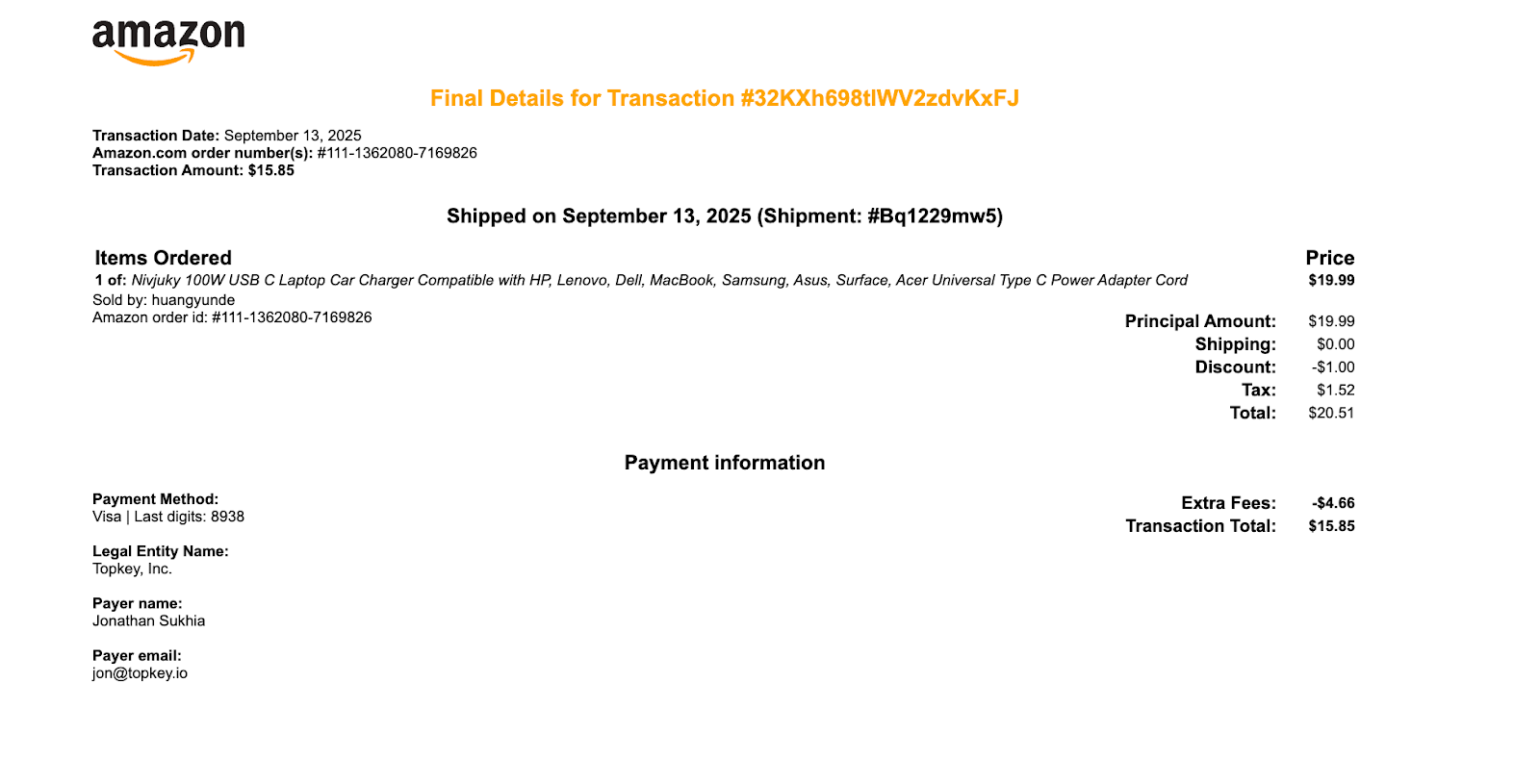
Automatic Receipt Generation & Perfect Matching
Here's where Topkey changes everything. When you connect your Amazon Business account to Topkey, the system starts pulling order data from Amazon automatically. At the same time, it's receiving transaction data from your card provider.
But Topkey doesn't just pull receipts from Amazon. It generates new receipts automatically—creating documentation that matches Amazon's format but is specifically designed for perfect transaction matching.
The intelligent matching algorithm uses the exact card information from both systems. If a card is enrolled in Topkey and used in Amazon Business, Topkey finds the match. It knows which charge corresponds to which order, even when they happen days apart.
For split shipments, Topkey generates separate receipts for each individual charge. That $500 order that split into three shipments? Topkey creates three receipts:
- Receipt A: $187 (matches first card charge exactly)
- Receipt B: $221 (matches second card charge exactly)
- Receipt C: $92 (matches third card charge exactly)
All three receipts link back to the original Amazon order, giving you a complete audit trail. No guesswork. No spreadsheets. No manual matching. No guesswork. No spreadsheets. No manual matching.
Bidirectional Linking Between Orders and Transactions
Topkey creates connections you can actually navigate. A "view matched transaction" button links directly from the Amazon order to the corresponding transaction in Topkey, giving you seamless access between order data and financial records.
AI-Powered Unit Mapping & Property Tagging
Property allocation happens automatically. Topkey's AI scans the purchase order field and location field in your Amazon orders, then cross-references this against your properties list imported from your PMS.
Based on naming conventions, shipping addresses, and property codes, Topkey assigns purchases to the correct property. Order shipped to "123 Ocean Dr"? Topkey knows that's your Ocean View property.
Once the system learns your patterns, property assignment becomes extremely hands-off. Your finance team reviews and approves assignments instead of entering them from scratch.
Owner-Ready Receipts Without the Manual Cleanup
The receipts Topkey generates are professional and accounting-ready—clean format, clear descriptions, itemized prices and quantities.
Line items are automatically categorized and you can flag items as billable to owners with a single click.
Export directly to owner statements without additional formatting. No manual cleanup required. The receipts are ready to go from the moment Topkey generates them.
Automated Amazon Description Cleanup for PMS
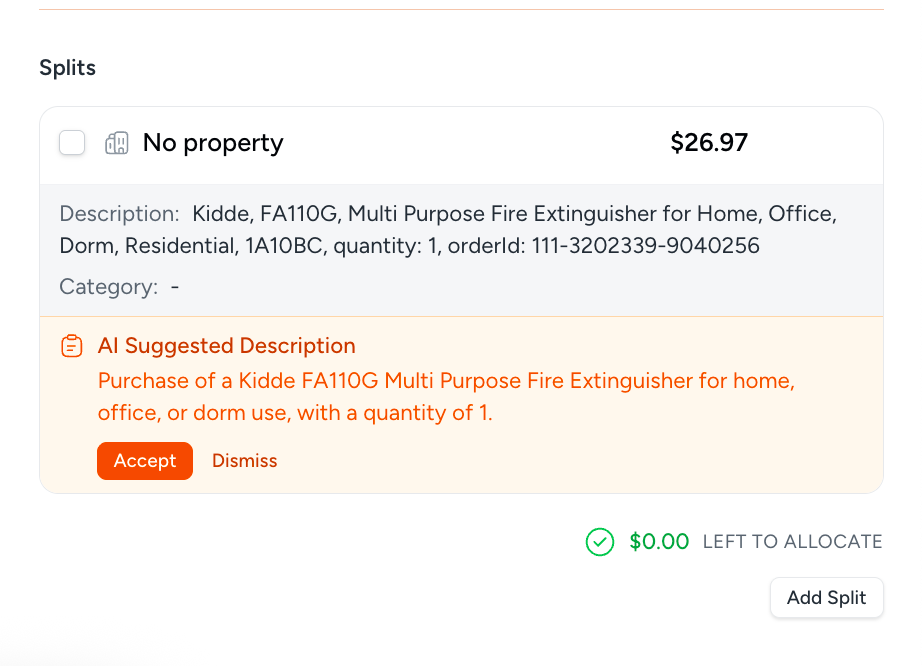
Remember those verbose, SEO-optimized Amazon descriptions? Topkey's AI fixes them automatically.
"Durable Heavy-Duty Commercial Grade Stainless Steel Deadbolt Lock with Anti-Drill Protection" becomes "Deadbolt Lock." The system makes automated suggestions, and you can accept them with one click.
This cleaner data flows outbound to your PMS and accounting systems, making the data more compatible across your entire financial tech stack.
Everything in One Consolidated View
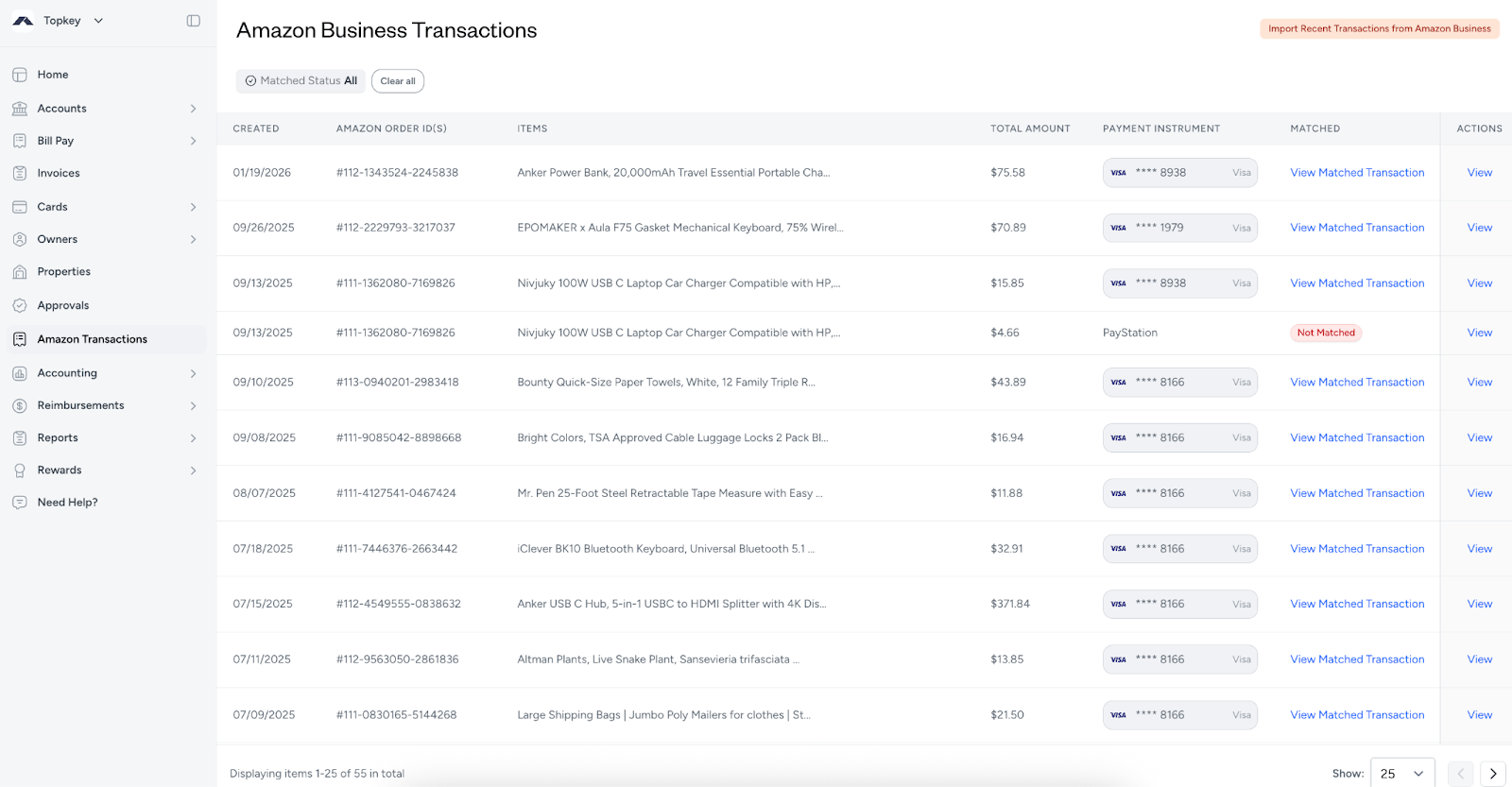
Topkey provides a dedicated "Amazon Transactions" page where all your order data lives. You can see orders, charges, receipts, and property allocations in one place.
The payment instrument column shows which card was used for each order. You can filter by property, date range, or reconciliation status.
No more toggling between Amazon emails, bank statements, and spreadsheets. Everything is visible, linked, and organized.
This consolidated view dramatically accelerates your month-end close process. What used to require hours of cross-referencing now takes minutes of review.
Automation with the Right Amount of Oversight
Topkey handles 99% of orders completely automatically—generating receipts, matching transactions, assigning properties, and cleaning up descriptions without manual intervention.
For complex scenarios like orders that span multiple properties, the system surfaces those for review. You maintain control without drowning in grunt work.
You're managing exceptions instead of processing every single transaction. That's the difference between a time-consuming process and an efficient one.
Setting Up Your Amazon Business Integration
Line Item Handling: Collapsed, Itemized, or Merged
Topkey gives you control over how line items appear on receipts. You have three options:
- Collapsed mode rolls multiple items into a single total line. If you order 10 different items totaling $100, you get one $100 line on the receipt.
- Itemized mode shows each item as a separate line. Those 10 items appear as 10 separate lines with varying amounts.
- Merge unknown card types is an additional setting that helps with matching accuracy when card type information is unclear.
Choose based on your accounting preferences and how you report to owners.
Property Auto-Assignment Configuration
The property assignment feature cross-references two specific Amazon fields—the purchase order field and the location field—against your PMS properties list.
You can set confidence thresholds to determine when Topkey auto-assigns versus when it flags for manual review. If Topkey is 95% confident about a property match, it can assign automatically.
The system learns your patterns over time. The more orders you process, the better Topkey becomes at understanding your naming conventions.
Card Visibility, Enrollment & Workflow Cleanup
The payment instrument column in Topkey clearly shows which card was used for each Amazon order.
Topkey flags charges from non-enrolled cards with a tooltip that says "This card's not managed by Topkey" with an action item to add the card to your system.
Non-enrolled cards stay out of your main transaction feed, so you're not seeing Amazon purchases that are irrelevant to your business. This workflow hygiene helps you distinguish business cards from personal cards.
What Gets Matched (and What Doesn't)
Not every Amazon payment method generates a Topkey receipt. Here's what works:
- Card-based payments are fully matched and reconciled automatically. This covers the vast majority of business purchases.
- Points redemptions don't get matched. There's no card charge to reconcile.
- Payment stations and alternative payment methods aren't supported for matching.
- Non-enrolled cards are flagged for visibility but not automatically reconciled.
Automatic Refund Tracking
When you return something to Amazon, Topkey captures the refund automatically. Refunds appear as negative amount receipts that link back to the original purchase.
The complete audit trail runs from purchase through refund. Property allocations carry through to refunds, so your accounting stays accurate.
How to Connect Amazon Business to Topkey
Connecting Amazon Business to Topkey
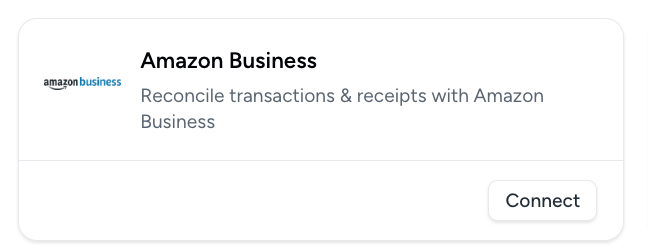
The setup process is remarkably simple. Navigate to Settings → Connections → Integrations → Amazon Business in your Topkey account.
Step 1)
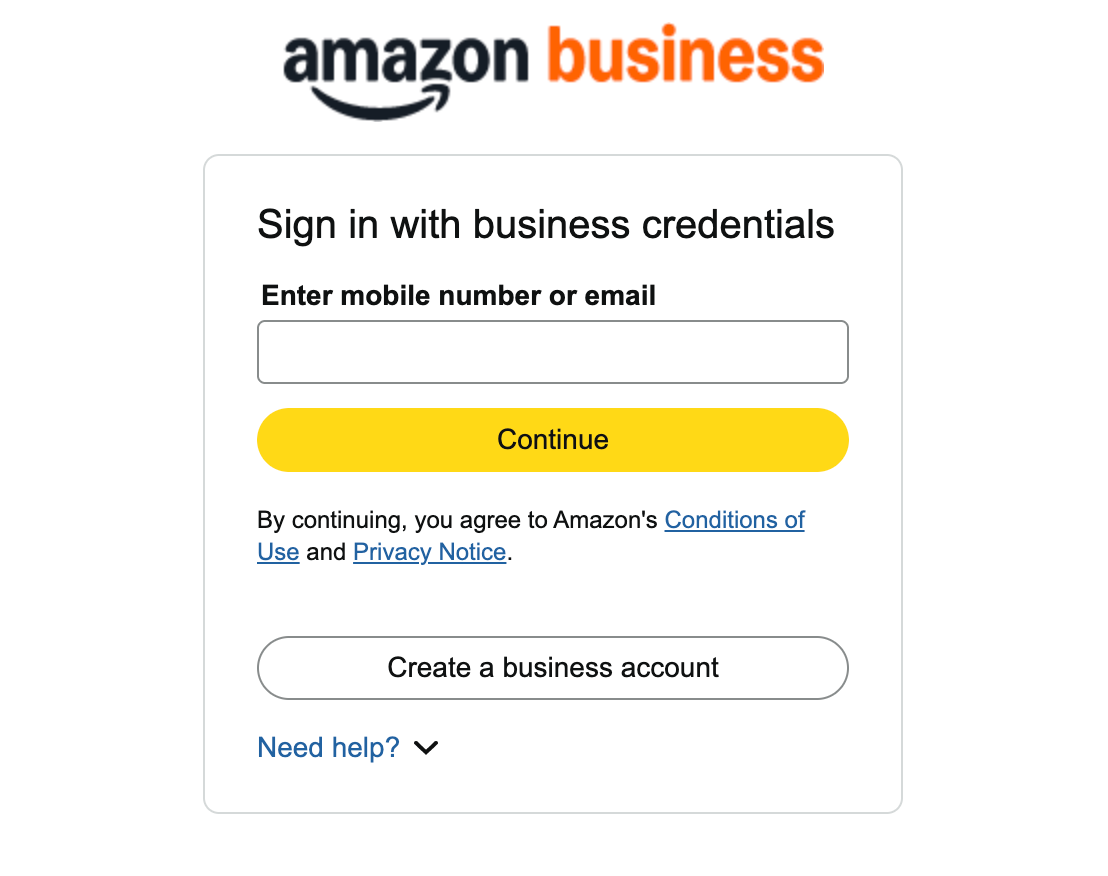
Step 2)
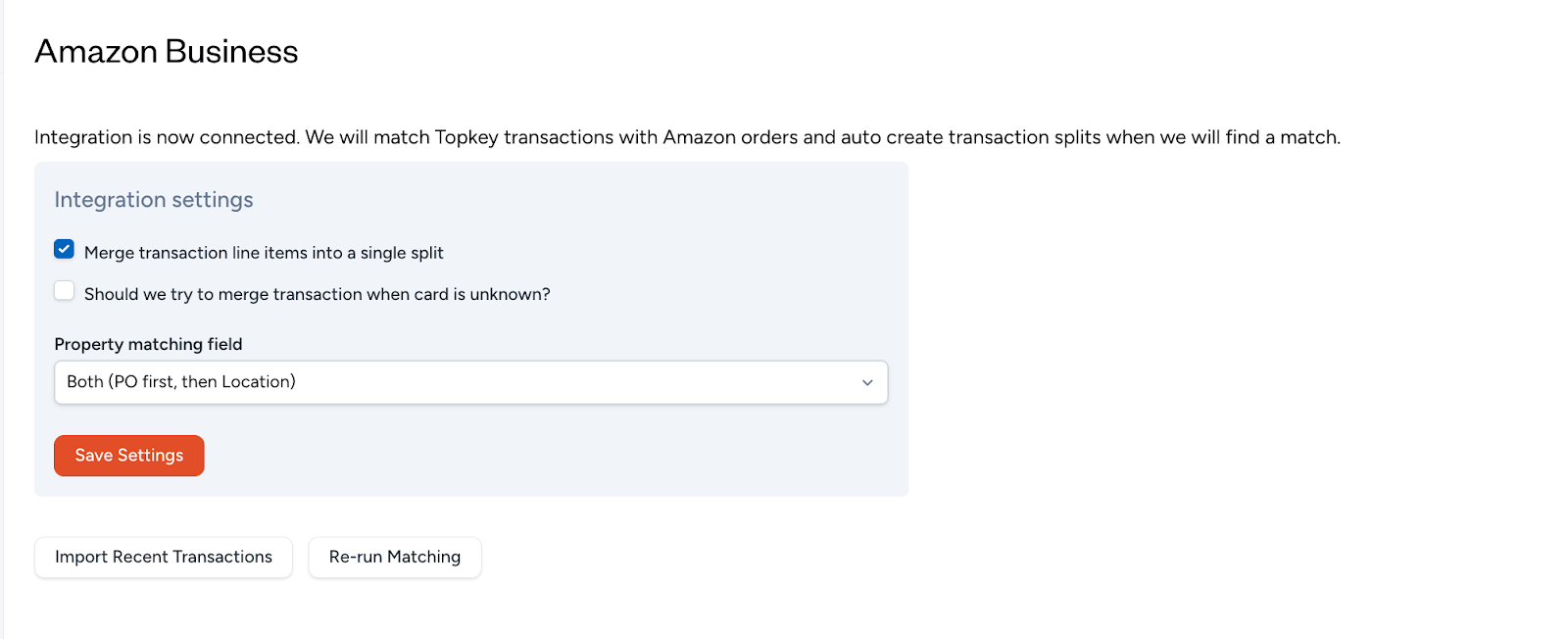
Step 3 (Final Step)
If you're already logged into Amazon Business in your browser, connection is literally a single click. The entire process takes seconds—no complex API configuration, no technical setup, no waiting.
Topkey supports connecting multiple Amazon Business accounts if you operate more than one.
Data Access & Permissions
Topkey requests read-only access to two specific data sets from Amazon Business:
- Charge Identifier data enables transaction matching. This is how Topkey knows which card charges correspond to which orders.
- Business Analytics data provides order details and itemization. This is where Topkey gets product descriptions, quantities, prices, and shipping information.
The access is read-only, meaning your Amazon account remains secure. Topkey can't modify orders, change settings, or make purchases on your behalf.
Configuring Integration Settings
Once connected, you'll configure a few key settings:
- Line item preferences (collapsed, itemized, or merge unknown card types)
- Property auto-assignment rules and confidence thresholds
- Description cleanup preferences
- Which cards should be tracked and reconciled
These settings take just a few minutes to configure based on your workflow preferences.
Viewing Amazon Data in Topkey
Once setup is complete, integrated orders appear in the dedicated "Amazon Transactions" sub-page in Topkey.
Historical orders import automatically based on your date range settings. You can start reconciling recent orders immediately, even if they were placed before you connected the integration.
Going forward, orders sync in real-time as charges and shipments occur. New Amazon purchases flow into Topkey automatically.
Benefits of Automated Amazon Expense Management
Dramatic Time Savings Every Month
Property managers report that Amazon reconciliation drops from 5-10 hours monthly to under 30 minutes.
That's not a small improvement—it's a transformation. Your finance team stops spending entire days on reconciliation and starts focusing on analysis and strategy.
Month-end close accelerates by days, not hours. When reconciliation happens automatically throughout the month, closing the books becomes dramatically faster.
Improved Accuracy Across the Board
Manual reconciliation introduces errors—matching the wrong charge to the wrong order, assigning expenses to the wrong property, missing split shipment charges entirely.
Topkey's automatic matching eliminates reconciliation errors using exact card information to ensure perfect charge-to-receipt matching. Split shipment handling ensures no charges are missed or duplicated, with each shipment getting its own receipt that links back to the original order.
Enhanced Owner Relations Through Better Documentation
Owners care about how their money is being spent. When they receive professional, itemized receipts, it builds confidence in your management.
Topkey's automated receipts are clean, clear, and easy to understand. Owners can see exactly what was purchased, how much it cost, and why it was necessary.
Faster billing cycles improve your cash flow. When reconciliation happens automatically, you can bill owners more quickly for reimbursable expenses.
Clear categorization helps owners understand expense necessity. They can see that "maintenance supplies" were purchased, not just a vague Amazon charge. The transparency improves the relationship.
Streamlined Financial Operations
Topkey's cleaned-up descriptions flow throughout your financial tech stack. When descriptions are concise and standardized, they work better in every system—from your PMS to your accounting platform.
Your PMS has field length limits. Your accounting system needs clear categories. Your owner statements should be professional. Topkey's condensed descriptions work better everywhere, making the data more compatible across your entire financial tech stack.
Property-level expense tracking improves budget accuracy. When every Amazon purchase is automatically allocated to the correct property, your budgets reflect reality and you gain better visibility into spending patterns across your portfolio.
Audit preparation becomes simpler with complete documentation and clear audit trails from order to payment to property allocation.
Scalability Without Added Workload
Topkey handles 10 properties or 100 properties equally well. Growth doesn't create proportional reconciliation burden—adding properties doesn't mean adding hours to your monthly reconciliation process.
New team members onboard quickly with automated workflows, requiring less institutional knowledge and dramatically reduced training time.
Why Connect Amazon Business to Topkey?
Amazon's Reports Don't Solve Reconciliation
Amazon Business provides order reports, but those reports stop short of actual reconciliation. You can download order data, but you still need to manually match that data to bank charges.
Property assignment remains entirely manual. Amazon doesn't know which of your properties received which items.
There's no receipt generation within Amazon Business. You get order data, but creating accounting-ready receipts requires additional work.
The Topkey Advantage
Topkey closes the gap between ordering and reconciliation. The system ingests data automatically from both Amazon and your card providers, creating connections that Amazon alone can't provide.
Topkey generates receipts automatically—it doesn't just pull Amazon data. These generated receipts are specifically designed for accounting workflows, with clean formatting and perfect transaction matching.
Intelligent matching eliminates manual cross-referencing. Property assignment happens automatically based on AI analysis.
You get complete reconciliation without spreadsheets or manual processes. From order placement to property allocation to accounting records, the entire flow is automated.
Seamless Integration with Your STR Tech Stack
Topkey's Amazon Business integration works alongside the industry's leading Property Management Systems (PMS) and accounting platforms. View our complete list of integrations to see all supported systems.
Property data automatically imports from your PMS, enabling intelligent expense allocation across your portfolio. Financial data exports cleanly to your accounting platform with professionally formatted receipts.
The integration requires no complex middleware or data mapping. Connect your Amazon Business account to Topkey, and the system handles data flow automatically.
What STR Leaders Say About Topkey + Amazon
Property management companies using Topkey's Amazon Business integration report transformative results:
- "We do most of our purchasing on Amazon, and the Topkey integration is incredible," says Natalie Enos, Revenue Manager at My Ocean Rental (90 units on Streamline). "Receipts auto-attach remove, so with one click I know exactly what the charge is and which owner it belongs to. What used to take hours every week now takes minutes, saving us 5–6 hours every single week."
- "The Amazon Business integration is a massive time-saver," says Steve Resnick, Co-Founder of HeavenlyRez (44 units on OwnerRez). "Every order and receipt flows in automatically, no more manual tracking."
- "Amazon receipts were the hardest to match, Topkey's integration solved that instantly," says Melissa Carrin, General Manager at Safiri Homes. "It saves us so much time and energy."
- "Topkey's Amazon integration is amazing," says Nate Klatt, CEO of HomeHop (90 units on Guesty). "It saves us so much time and energy by automatically syncing transactions and receipts, which used to take hours every week."
- "Topkey pulls in every Amazon transaction from our business account instantly," notes Traci Drake, Owner and Broker at My Sweet Stay (46 units on Hostaway). "Even when personal purchases show up, they're easy to filter out. What used to require manual review now takes seconds."
The common thread? Dramatic time savings, improved accuracy, and the elimination of manual reconciliation work. Teams consistently report 80-90% time savings on Amazon reconciliation specifically.
Common Questions Property Managers Ask
Do I Need Amazon Business?
Yes, this integration specifically requires an Amazon Business account. Personal Amazon accounts won't connect to Topkey.
If you're currently using a personal Amazon account for property management purchases, you'll need to upgrade to Amazon Business. Amazon Business gives you business pricing, quantity discounts, multi-user accounts, and purchasing controls that aren't available on personal accounts.
How Quickly Does This Work?
Setup takes literally seconds if you're logged into Amazon Business when you connect. There's no waiting period, no approval process, no technical configuration.
The benefits are immediate once connected. Historical orders import automatically based on your date range settings in the configuration.
There's no training period needed for the system. It works from day one. Property auto-assignment does improve over time as the AI learns your specific patterns.
What About Orders Placed Before I Connected?
Topkey imports historical orders based on your configuration settings. You can typically reconcile recent orders retroactively.
Moving forward, all orders sync automatically in real-time. New purchases, new shipments, new charges—everything flows into Topkey as it happens.
What If an Order Doesn't Auto-Match?
The system handles 99% of standard orders automatically, but complex situations occasionally require review.
Orders with low matching confidence surface for manual review. Topkey shows you these orders and provides easy manual matching tools within the interface.
Even when manual intervention is needed, you're working with organized, linked data rather than hunting through disconnected systems.
Does This Cost Extra?
The Amazon Business integration is included in Topkey's property management banking platform. There's no separate fee for the integration itself.
The ROI is typically realized within the first month through time savings alone. When your finance team saves 5-10 hours monthly on reconciliation, the value is immediate and measurable.
Transform Your Amazon Reconciliation Today
Amazon reconciliation doesn't have to consume hours of your finance team's time every month. The split shipments, the property assignments, the description cleanup, the charge matching—all of it can happen automatically.
Topkey's Amazon Business integration generates professional receipts automatically, matches them perfectly to card charges, assigns expenses to the correct properties, and handles split shipments without any manual work. What used to take hours now takes seconds.
Your month-end close accelerates. Your accuracy improves. Your owners receive better documentation. Your team focuses on analysis instead of data entry. And most importantly, your reconciliation workflow scales as your portfolio grows.
Ready to see it in action? Schedule a personalized demo to see exactly how Topkey handles your specific reconciliation challenges. Or start a trial to experience automated reconciliation firsthand.
Setup takes seconds. The benefits last forever. Join the property managers who are already saving hours every month with Topkey's automated Amazon reconciliation.
See the Topkey difference.