
Short-Term Rental Receipt Tracking Template
Download this customizable receipt tracking template designed for vacation rental managers.
How to Use This Receipt Tracking Template
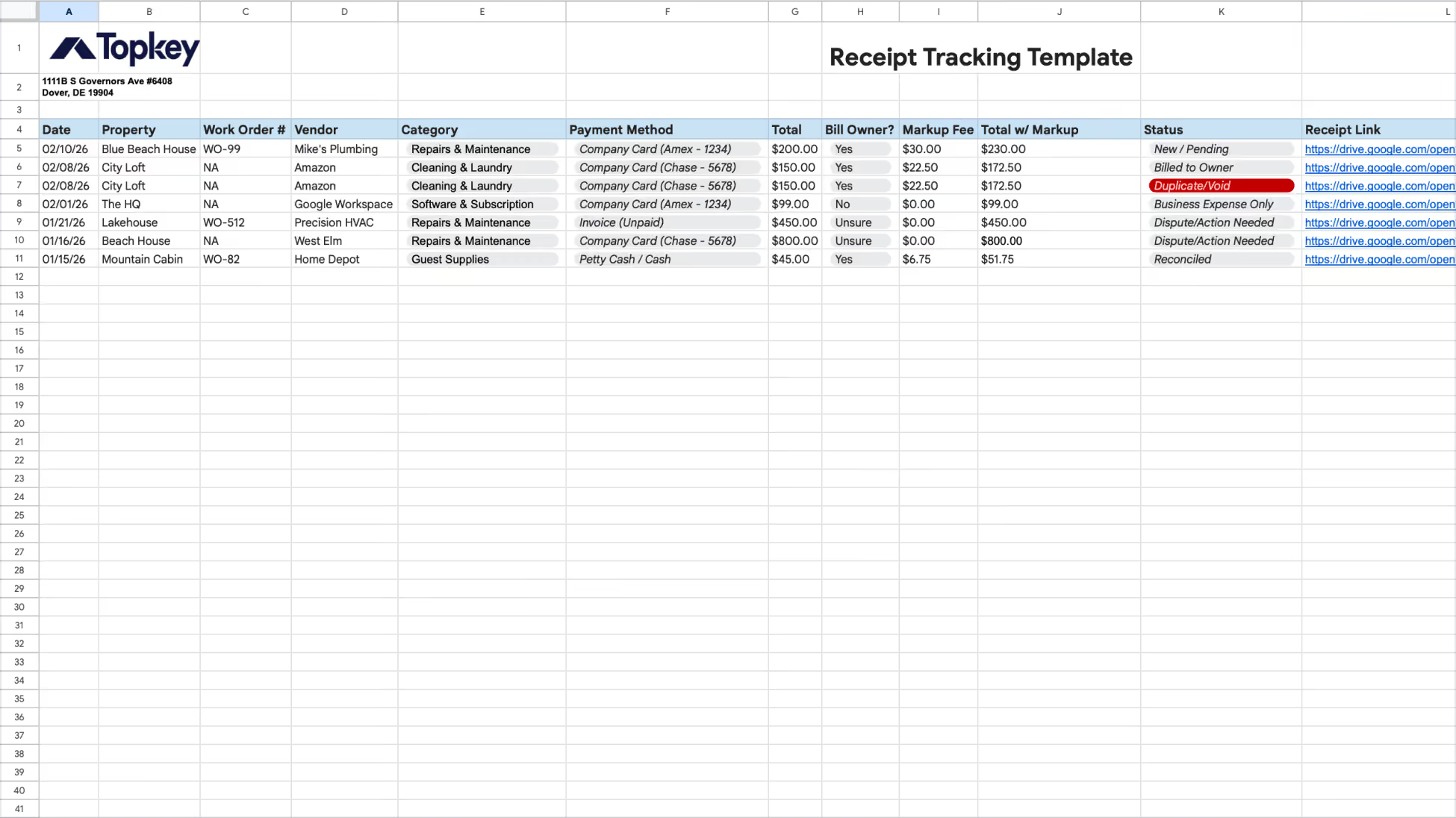
A clean receipt tracking system is essential for accurate financials in a vacation rental business, but generic templates often fail to account for the specific needs of STRs. This template is built specifically for vacation rental and short-term rental managers, with STR-ready categories, manual markup logic, and 1099-NEC tax flagging. Use it to maintain clean financials, prevent expense leakage, and ensure every reimbursable cost is captured for owner statements.
To get started: Make a copy of this Google Sheet (File → Make a copy) and tailor it to your business.
Overview: What This Template Is Designed to Do
This template provides a complete manual structure for logging property-level expenses. It acts as a bridge between daily maintenance and your monthly owner reporting.
This template helps you:
- Track Reimbursable Expenses: Capture every guest supply or repair to ensure it is billed back to the correct owner.
- Automate Markup Logic: Automatically calculate your management fee on top of vendor costs (e.g., adding $30.00 to a $200.00 plumbing bill).
- Manage 1099 Compliance: Identify which service-based vendors (like Mike's Plumbing or Precision HVAC) require 1099-NEC reporting, while excluding corporations like Amazon or Google.
- Prevent Expense Leakage: Avoid missing out on reimbursements due to lost receipts or poor tracking by documenting every transaction immediately.
What This Template Includes
- Property & Work Order Detail: Columns to link expenses to specific properties and manual Work Order numbers (e.g., "WO-99").
- Categorization & Payment Method: STR-specific dropdowns including Cleaning & Laundry, Repairs & Maintenance, Guest Supplies, and Utilities & WiFi.
- Billing Decision Logic: A "Bill Owner?" dropdown with Yes, No, and Unsure statuses to control reimbursement flow.
- Workflow Status: Track the lifecycle of an expense from New/Pending to Billed to Owner, Reconciled, or Dispute/Action Needed.
- Documentation & Tax Flags: Dedicated spots for Receipt Links, Tax Year, and 1099 Eligibility.
Recommended Use
- Record as you go: Record expenses from your card or petty cash systems immediately to avoid missing reimbursable owner charges.
- Use the "Unsure" Status: If a repair or billing amount is in dispute (e.g., Precision HVAC), set the status to Dispute/Action Needed to prevent billing the owner until resolved.
- Link Digital Receipts: For every entry, paste the Google Drive URL in the Receipt Link column to provide transparency for owners.
- Reconcile Monthly: Before generating owner statements, ensure all billed items match your bank or card activity and move them to Reconciled.
Questions or Need Help?
If you need support or want help automating this process, email: info@topkey.io.