Updated November 2026
Hostaway is the hub of your business, yet much of what happens around a stay runs through other software. Someone adjusts rates when a big event comes to town. Someone screens a last-minute booking. Someone tracks down the receipt for a new coffee maker so it lands on the right owner's statement.
When that software isn't connected to Hostaway, your team fills the gap by hand.
Hostaway integrations close that gap. The Hostaway Marketplace lists more than 200 partner integrations, and most connect with an API key you create in your Hostaway settings.
We chose these 15 based on how widely professional vacation rental managers use them and whether each one covers a core job. The numbers show reading order only, not rank. Any of them is a strong option, and they pair well with each other.
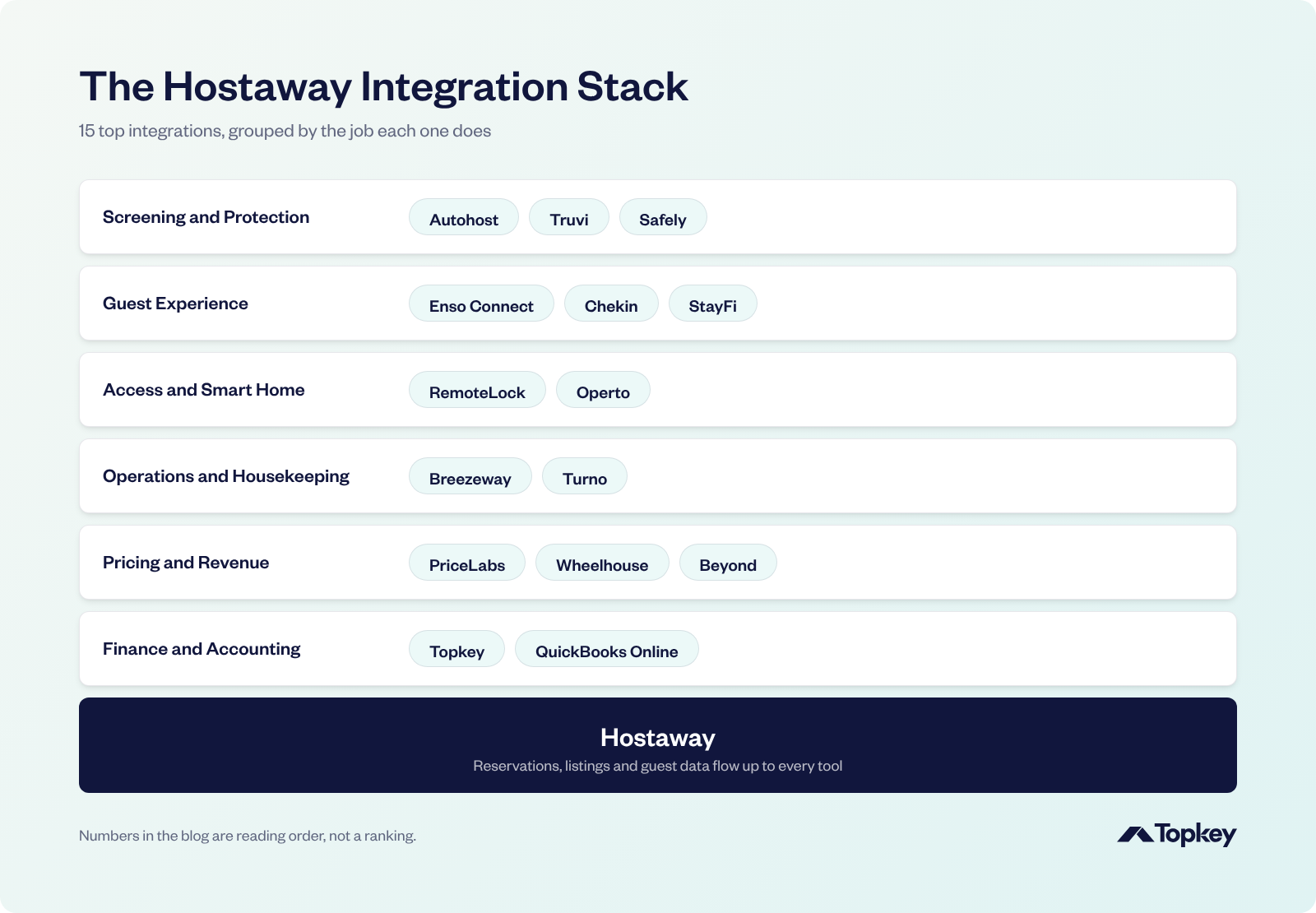
Finance and Accounting
Every expense should end up on the right owner's statement, and every reservation in the company books.
1. Topkey
Topkey is the AI-powered financial operating system built specifically for vacation rental managers. Integrating directly into Hostaway and your accounting software, Topkey provides a single, unified system that automates expenses, bookkeeping, receipts, banking, corporate cards, AP/bill pay, inventory, and revenue reconciliation, so you can get back to what matters: hospitality. For Hostaway users, it's where card charges, receipts and vendor bills become property expenses in Hostaway, with no re-entry. It's available in the Hostaway Marketplace.
How it works with Hostaway. Topkey syncs with Hostaway and your accounting software, so the costs behind every property arrive complete:
- Expenses and owner charges. Tag a card or bank charge to the right Hostaway property, and Topkey pushes it with the receipt, notes, vendor and your markup already calculated. Supplies checked out from inventory are tied to the right owner the same way.
- Vendor bills. Bills are logged in Topkey, assigned to Hostaway properties and paid in bulk by ACH or check. The expense is recorded against the property in Hostaway, and the payment syncs to your accounting software.
- Property sync. Topkey uses the same property IDs and names as Hostaway, so every expense, bill and task stays tied to the right unit.
- Field work. Completed Breezeway tasks come into Topkey, where you attach the receipt or card charge and push it to Hostaway as a property expense.
Why it helps. Owner charges reach Hostaway itemized, marked up and receipted, so owner statements get finalized faster without anyone re-keying the math. Month-end close goes from days to hours, your team saves at least 25 hours a month, and owner billables go up 15% to 20%.
2. QuickBooks Online
QuickBooks Online is Intuit's cloud accounting software, used by many Hostaway managers for their company books.
How it works with Hostaway. Hostaway's built-in QuickBooks Online integration creates and updates invoices for reservations, plus bills, automatically or on demand. You set it up in Hostaway under Financial Reporting, then QuickBooks. It connects one QuickBooks company per Hostaway account.
Why it helps. Reservation revenue reaches your books without anyone typing invoices, so your financial reports stay current.
Pricing and Revenue
Hostaway leaves dynamic pricing to its partners. These three are the most common choices, each with a different approach.
3. PriceLabs
PriceLabs is a dynamic pricing and revenue management platform that sets nightly rates and minimum stays from market data and your own rules.
How it works with Hostaway. Once connected, PriceLabs sends dynamic rates, minimum stays and check-in and check-out restrictions to your Hostaway listings for dates up to 540 days ahead.
Why it helps. Your rates follow demand on every channel Hostaway manages, and managers who like detailed rules can fine-tune almost everything.
4. Wheelhouse
Wheelhouse is a revenue management platform that recommends nightly prices from its own market data.
How it works with Hostaway. You paste your Hostaway account ID and API key into Wheelhouse to connect. Wheelhouse imports your listings, and once you're happy with a pricing strategy, it syncs prices to Hostaway.
Why it helps. You can pick a more conservative or more aggressive pricing approach, and Wheelhouse handles the daily updates from there.
5. Beyond
Beyond is a revenue management platform for short-term rentals that covers dynamic pricing and market data.
How it works with Hostaway. Once connected, Beyond sends rates, minimum stays including gap fills, and check-in and check-out rules to Hostaway.
Why it helps. Short gaps between bookings get priced and opened up, so fewer nights sit empty.
Operations and Housekeeping
These two keep every unit cleaned and checked between guests.
6. Breezeway
Breezeway is a property care and operations platform for cleaning, inspections and maintenance, with checklists and photo proof from the field.
How it works with Hostaway. Breezeway connects directly to Hostaway and syncs your property details and reservations automatically, so tasks are scheduled around each stay.
Why it helps. Your field team works from the live booking calendar, and you can confirm each unit is ready before the next guest arrives.
7. Turno
Turno is cleaning scheduling software with a marketplace of local cleaners.
How it works with Hostaway. In Turno's integration settings, you choose Hostaway, then link each Hostaway listing to a Turno property. Cleanings are scheduled from the reservation calendar and managed in Turno.
Why it helps. Every checkout gets a cleaning on the schedule, and a backup cleaner is easy to find when someone cancels.
Access and Smart Home
Door codes should start and stop with each reservation, with nobody setting them by hand.
8. RemoteLock
RemoteLock is cloud access control software that works with many smart lock brands.
How it works with Hostaway. After you authorize RemoteLock, Hostaway creates door codes for new and changed reservations. Changing a reservation's dates updates the code's valid times, and canceling the reservation revokes access.
Why it helps. Codes follow every booking change automatically, so a moved or canceled stay never leaves a working code behind.
9. Operto
Operto offers guest experience, smart device and team tools for vacation rentals.
How it works with Hostaway. When a reservation is made in Hostaway, it's pushed to Operto. Operto generates a unique access code and sends it back to Hostaway as a variable you can drop into guest messages.
Why it helps. Every guest gets a unique code in the messages you already send, and Operto can manage your other connected devices too.
Guest Experience
Check-in, guest questions and repeat bookings all run through this group.
10. Enso Connect
Enso Connect is an AI guest experience platform with messaging, a branded guest app, digital check-in and upsells.
How it works with Hostaway. Enso connects with a Hostaway API key. Bookings, guests and messages sync by webhook, usually in under two minutes, and Enso writes check-in changes, guest details and its Boarding Pass link back to Hostaway.
Why it helps. Guests check in and buy extras from their phone, and AI answers routine questions so your team doesn't have to.
11. Chekin
Chekin is an online check-in platform that handles guest registration, ID verification and keyless access.
How it works with Hostaway. You connect Chekin with your Hostaway account ID and API key when you create your Chekin account. Chekin imports active and upcoming bookings, lead guest details and door codes, and updates automatically when a booking changes.
Why it helps. Guests register and verify their ID before they arrive, which helps with local registration rules and makes self check-in simple.
12. StayFi
StayFi is guest Wi-Fi and marketing software for short-term rentals.
How it works with Hostaway. StayFi imports your Hostaway properties and guest contacts, and it can alert you when more people join the Wi-Fi than the Hostaway booking lists.
Why it helps. You build a list of past guests to invite back to book direct, and you hear about an oversized group while they're still there.
Screening and Protection
Screening catches risky bookings before arrival, and protection covers the damage if something still goes wrong.
13. Autohost
Autohost is an AI guest screening platform for short-term rentals.
How it works with Hostaway. Autohost connects to Hostaway and adds three custom fields to each reservation: verification status, guest portal completed and risk color. You can use those fields in Hostaway's automated messages, for example to hold check-in instructions until a guest is verified.
Why it helps. Your team only steps in on the bookings Autohost flags, and door codes don't go out until a guest is cleared.
14. Truvi
Truvi provides guest screening, damage protection and incident resolution for short-term rentals.
How it works with Hostaway. Truvi connects to your Hostaway account, so screening runs on your reservations automatically and damage protection applies to the stays Truvi has screened.
Why it helps. Problem guests get caught before check-in, and you can lean less on security deposits.
15. Safely
Safely provides commercial vacation rental insurance and guest verification.
How it works with Hostaway. After signing with Safely, you send Safely your Hostaway account ID and API key to connect, and the Safely fee is added to each reservation as a mandatory fee. Hostaway also offers Hostaway Insurance powered by Safely as a separate, built-in option.
Why it helps. Each stay has an insurance policy and guest verification behind it, not just a deposit.
How These Integrations Fit Together
It's 4 p.m. on a Friday when a last-minute booking comes in. PriceLabs had already lowered the price on the gap night that made it possible. Autohost screens the guest and clears them. Chekin collects their ID before arrival. RemoteLock issues a code that works only for the weekend. Turno puts a cleaner on the schedule for Sunday. And when the cleaner replaces a broken coffee maker, Topkey sends the receipt to Hostaway as an owner expense with the markup applied.
Nobody on your team opened a spreadsheet all weekend.
You'll find all of these in the Hostaway Marketplace.
Hostaway Integrations FAQ
What is the Hostaway Marketplace?
It's Hostaway's directory of more than 200 partner integrations, covering pricing, operations, smart locks, guest experience, screening and finance. Each partner connects to Hostaway through its API.
How do I connect a Hostaway integration?
In Hostaway, go to Settings, then Hostaway API, and create an API key. Then enter your account ID and API key in the partner's app, or follow the partner's own connection steps.
Does Hostaway integrate with QuickBooks?
Yes. Hostaway has a built-in QuickBooks Online integration that creates invoices for reservations and syncs bills. It connects one QuickBooks company per Hostaway account.
How do I get expenses onto Hostaway owner statements?
Expenses and owner charges post to the property in Hostaway. Expense tools like Topkey create them from card and bank charges, with the receipt and markup included.
What smart locks work with Hostaway?
RemoteLock and Operto both automate access codes from Hostaway reservations. Hostaway also has its own smart lock feature for supported devices.
What guest screening tools work with Hostaway?
Autohost, Truvi and Safely all screen Hostaway reservations, and Chekin handles online ID verification at check-in.
If owner expenses and receipts still get typed into Hostaway by hand, see how Topkey works with Hostaway.
See the Topkey difference.