OwnerRez handles bookings, owners and the monthly Owner Statements that subtract the expenses you record under PM > Expenses. It doesn't capture spending in the field, pay vendors or turn a card swipe into one of those expenses. That work usually lands on one person with a spreadsheet at month-end.
Topkey's OwnerRez integration closes that gap. It connects your cards, bills and bank accounts to OwnerRez, sends receipt-backed expenses to PM > Expenses with markups applied, and pays vendors and owners in bulk. HeavenlyRez grew from 12 to 95 properties on OwnerRez and now saves 10+ hours a week on work that used to live in Excel.
Topkey + OwnerRez at a Glance
- What it is: a direct connection between Topkey and OwnerRez, set up through OwnerRez's own sign-in.
- What Topkey pulls from OwnerRez: properties, owners, bookings and their charges.
- What Topkey sends to OwnerRez: expenses with the property, date, description, marked-up amount, expense category, vendor name and receipt, plus charges on a guest's booking.
- Who it's for: short-term rental property managers on OwnerRez who want less retyping, fewer missed owner billables and a faster month-end.
- What else connects: Breezeway, QuickBooks Online, Xero, Oracle NetSuite, Sage Intacct, Amazon Business and the business cards you already use.
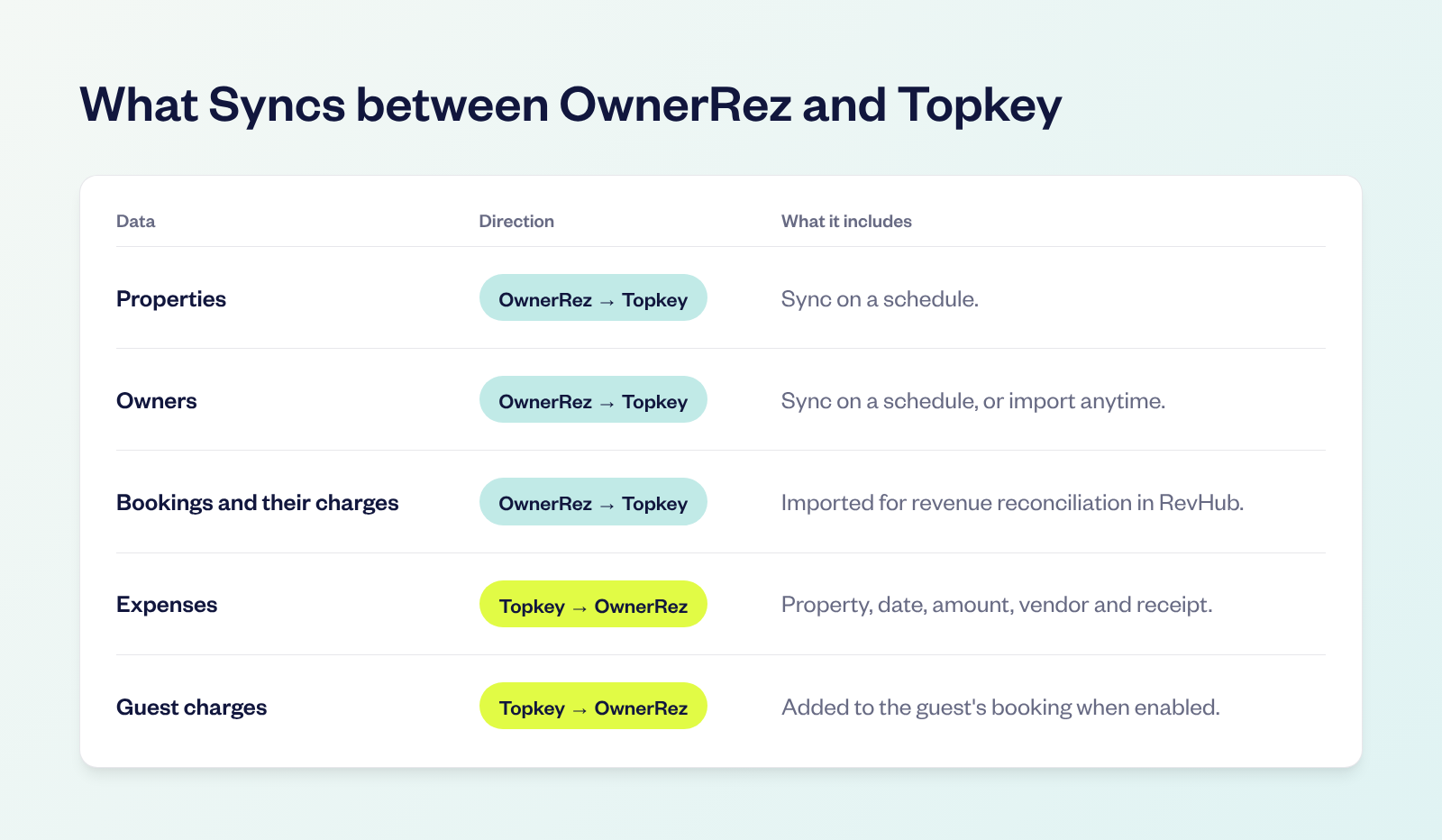
What Syncs between Topkey and OwnerRez
Properties and owners sync from OwnerRez on a schedule, and you can click Import Owners to bring owners in right away. Bookings come in for revenue reconciliation in RevHub. Expenses only go to OwnerRez when someone on your team sends them, so nothing lands on an Owner Statement by accident.
Why OwnerRez Teams Still Lose Time at Month-End
Every expense on an OwnerRez Owner Statement starts somewhere else: a plumber's invoice, a cleaner's supply run on a company card, coffee pods ordered on Amazon.
Without an integration, someone matches each charge to a receipt, works out the property, decides whether the owner pays, then opens PM > Expenses and types in the date, amount, description and category. At 12 properties that's an afternoon. At 95 it's a job.
That's where Steve Resnick, Co-Founder of HeavenlyRez, found himself as his portfolio grew. "It was becoming unmanageable because I was doing everything in an Excel spreadsheet, and obviously that's not sustainable at scale," he says.
When the work piles up, small things slip. A $40 part never makes it onto a statement. A receipt never turns up, so the charge gets eaten instead of billed to the owner. Every expense that never reaches PM > Expenses is cash your company covers.
How the Topkey + OwnerRez Integration Works
Capture Every Expense at the Point of Sale
Connect the business cards you already use, or issue Topkey corporate cards. When someone swipes, they get a text with a link to add the receipt, pick the OwnerRez property and mark whether the owner pays, right from their phone.
- AI coding: Topkey suggests a GL code for each charge.
- Merchant rules: merchant rules code repeat vendors, like your pool company, with the property, category and Bill to Owner already set.
- Amazon Business: Amazon Business orders arrive with the order number and receipt.
Send Expenses to OwnerRez Your Way
Bill to Owner charges are ready to become work orders. Your team creates them one at a time or in bulk, and Topkey sends each one to PM > Expenses with the property, date, description, amount, vendor name and expense category filled in.
- Owner expenses: the date starts as the transaction date, so expenses land in the month they happened, and you can change it before sending.
- Guest charges: if your connection is set up for reservation charges, a lost key or an item shipped home goes to OwnerRez as a charge on that guest's booking instead of an expense.
- Receipts: turn on Sync Topkey receipts to OwnerRez and the receipt travels with the expense, so the backup is already there when an owner asks.
- Categories: set a Default expense category once. If you've built your own categories in OwnerRez, Import Custom Categories brings them into Topkey so the two systems match.
Card charges go to OwnerRez only after they settle and someone on your team sends them.
Apply Markups without Doing the Math
Set a markup percentage by vendor or property group, and Topkey applies it before the expense leaves. OwnerRez receives the marked-up amount, so the Owner Statement shows the right total without anyone reaching for a calculator.
Pay Vendors in Bulk
The plumber still needs to get paid. Bill Pay reads vendor invoices, codes them to the right OwnerRez property and GL account, and routes larger ones through approval workflows.
An invoice has to be approved before its expense can go to OwnerRez. Once it is, pay vendors in bulk by ACH or check, and the same invoice becomes the expense in PM > Expenses. Nobody pays through Zelle or a bank portal and then enters the invoice again.
Pay Every Owner in One Batch
Owner payouts don't have to mean one transfer at a time. Import owner payout amounts from a CSV or create them in bulk, send them through approval, then select the requests that are Ready To Pay and pay them together by ACH. Owners add or update their bank details through a secure link, so a failed payment is a quick fix.
Revenue Reconciliation for OwnerRez Users
Month-end also means proving every booking was paid. RevHub brings in your OwnerRez bookings with their channel, dates, expected amount and charge lines.
- Matching: RevHub matches those bookings to the payouts and deposits that land in your bank.
- Stripe: Stripe payouts are matched to the OwnerRez bookings behind them.
- Exceptions: underpayments, overpayments and anything that doesn't match are flagged during the month, not discovered at close.
Your team reviews the exceptions instead of rebuilding every deposit by hand.
Owner Statements in OwnerRez
OwnerRez builds the Owner Statement. Topkey makes sure everything that belongs on it gets there, with the receipt attached and any markup already applied.
The revenue side has been checked too. By the time a statement goes out, RevHub has matched the bookings behind it to the money that came in. Statements go out as a review, not a rebuild.
Inventory That Reaches the Owner
Supplies are hard to bill back because they leave the closet a few items at a time, and nobody types a roll of paper towels into PM > Expenses. With Inventory Management, your team checks supplies out to a property from the Topkey storefront, stock levels update as they go, and each checkout saves the price the owner should pay, including any markup rules you've set.
When it's time to bill, select the checkout lines, or pull them from the Inventory Charges report, and create a work order. Topkey sends it to OwnerRez as an expense, or as a charge on the guest's booking if the supplies belong to a stay. A turnover kit becomes a line on the Owner Statement instead of a cost your company covers.
Breezeway, Accounting Software and the Rest of Your Stack
- Breezeway: finished Breezeway tasks come into Topkey with the property attached. Review them, attach the charge or bill that paid for the work, and send the cost to OwnerRez.
- Accounting software: the same coded transactions sync to QuickBooks Online, Xero, Oracle NetSuite or Sage Intacct. OwnerRez gets the owner side and your books get the company side, from the same charge.
- Cards: keep the cards and rewards you already have, and add receipt capture and property coding on top.
Results OwnerRez Customers Are Seeing
HeavenlyRez runs OwnerRez with QuickBooks Online. Since moving expenses and accounts payable off a spreadsheet and onto Topkey, the team has seen:
- 10+ hours saved every week on work that used to live in Excel.
- $5k+ in owner billables recovered that had been slipping through.
- 300+ owner transactions a month processed through Topkey.
HeavenlyRez buys most of its linens, amenities and consumables on Amazon, so a big share of its spend now arrives coded without anyone hunting for receipts. Steve's team can keep adding homes without adding spreadsheet hours.
How to Set Up the Integration
You'll need Admin access in Topkey and an OwnerRez login.
- Connect OwnerRez. In Topkey, go to Settings, then Integrations, click the OwnerRez tile, then sign in to OwnerRez and approve access.
- Check owners and properties. Both sync on a schedule. Click Import Owners to bring owners in right away, and make sure each property is matched to the right owner.
- Set your defaults. Turn on Sync Topkey receipts to OwnerRez, pick a Default expense category and set any markup percentages by vendor or property group.
- Connect your cards and bank accounts. Connect the cards you already use or issue Topkey corporate cards, and turn on receipt reminders.
- Send one test expense. Create a work order from one Bill to Owner charge, send it, and check it in PM > Expenses and on a preview Owner Statement before the whole team starts.
Frequently Asked Questions
What Does the Topkey OwnerRez Integration Do?
It connects Topkey to OwnerRez through OwnerRez's own sign-in. Properties, owners and bookings come into Topkey. Expenses with receipts and markups, plus charges on a guest's booking, go back to OwnerRez. Topkey adds corporate cards, Bill Pay, owner payouts, receipt capture, revenue reconciliation and accounting sync in one platform built for short-term rental property managers.
What Is the Best Expense Management Software for OwnerRez?
If you want card charges and vendor invoices to land in OwnerRez without retyping, Topkey is built for that job. It combines corporate cards, receipt capture by text, AI coding, Bill Pay, approval workflows and merchant rules, then sends coded expenses to PM > Expenses with the receipt attached.
How Do I Automate Owner Statements in OwnerRez?
OwnerRez builds the Owner Statement. The slow part is getting every expense onto it. With Topkey, charges are coded to the property at the moment of purchase, marked Bill to Owner and sent to PM > Expenses in a batch with receipts attached. HeavenlyRez processes 300+ owner transactions a month this way.
How Does Topkey Handle Markups for OwnerRez?
Set a markup percentage by vendor or property group, and Topkey applies it before the expense is sent. OwnerRez receives the marked-up amount as the expense amount.
Can Topkey Reconcile OwnerRez Bookings and Payouts?
Yes. RevHub brings in your OwnerRez bookings, matches them to the payouts and deposits that land in your bank, and flags underpayments, overpayments and anything that doesn't match.
Does Topkey Work with Breezeway and OwnerRez Together?
Yes. Finished Breezeway tasks come into Topkey with the property attached. Your team attaches the charge or bill and sends the cost to OwnerRez.
Do I Have to Switch Credit Cards to Use Topkey with OwnerRez?
No. Connect the business cards you already use and keep your rewards, or issue Topkey corporate cards. Either way, each charge gets a receipt request by text and an OwnerRez property.
Your Back Office Shouldn't Be the Bottleneck
If your portfolio is growing faster than your finance team, the expense spreadsheet is usually the first thing to break. Topkey keeps expenses, receipts and payments flowing into OwnerRez as you add homes, so month-end stays manageable at 20 homes or 200.
Want to go further? See how the QuickBooks Online integration keeps the company side of your books current, and set up merchant rules so recurring charges arrive already coded.
See the Topkey difference.