
Month-End at a BrightSide Company
It's the last week of the month, and the books close in a few days. Card statements are open on one screen, BrightSide is open on the other, and there's a thread of texts to the maintenance team asking what a hardware store charge was for. Nobody remembers. The receipt might be in a truck.
BrightSide is built for this industry. It's family-owned, has been building vacation rental software since 1981, and runs reservations, housekeeping, maintenance work orders, trust and escrow accounting, and owner statements for property managers from the Smoky Mountains to the coast. In BrightSide, the invoices on a work order are what get charged to the owner. But the purchase behind each invoice happens in a checkout line or a truck, and the two only meet days later, when someone enters the invoice by hand, if it gets entered at all.
A bookkeeper at a 200+ unit vacation rental company described the same problem before her team changed how it captured expenses: "We knew that we were leaving money on the table, that there were receipts that were missing and expenses that we never got an answer for and weren't able to then charge our owners." Those unbilled expenses cost money. The ones that do get billed without a receipt can cost something harder to win back: an owner's trust when they ask what a repair was for and nobody can show them.
Topkey is a financial automation platform built for vacation rental property managers. It captures receipts from card purchases, codes each expense to a unit and owner, applies your markups, and pays contractors. Topkey's BrightSide integration connects that work to your BrightSide work orders. Below is how it works, what it sends where, what stays in BrightSide, and which steps your team still owns.
Why Maintenance Spend Slips Through the Cracks
The Receipt Chase Eats the Week
Maintenance purchases happen in the field, on several cards, at all hours. Receipts fade in a glove box, get thrown out with the bag, or never get taken at all.
By month-end, finance is reconstructing each purchase from a card statement and someone's memory, then entering it as an invoice on a BrightSide work order or as a separate owner charge. It's slow, and it falls on the same person every month.
Unbilled Repairs Cost Real Money
The purchases that never get reconstructed never get billed. A part here, a hardware store run there. None of it feels big enough to chase, but across a busy season it adds up to real cash leakage.
Small repairs leak the most, because nobody stops to work out a markup on a small part. Capturing those hidden owner billables can boost profit by up to 28%.
What to Look for in an Expense Tool If You Run BrightSide
Expensify and Bill.com work well for general business spend. A BrightSide company needs a tool that does four more specific things:
- Codes each charge to a BrightSide unit, not just a GL account.
- Applies your markup before the charge reaches the owner.
- Creates the invoice on the BrightSide work order.
- Puts the receipt on the work order, where owner questions get answered.
Most general expense tools weren't built around units or owner billing, so someone still matches each charge to a unit and keys it into BrightSide line by line. Those four are worth checking against any tool you evaluate. The rest of this post shows how Topkey handles each one with BrightSide, on the business cards you already use.
How the Topkey + BrightSide Integration Works
What Syncs Between BrightSide and Topkey
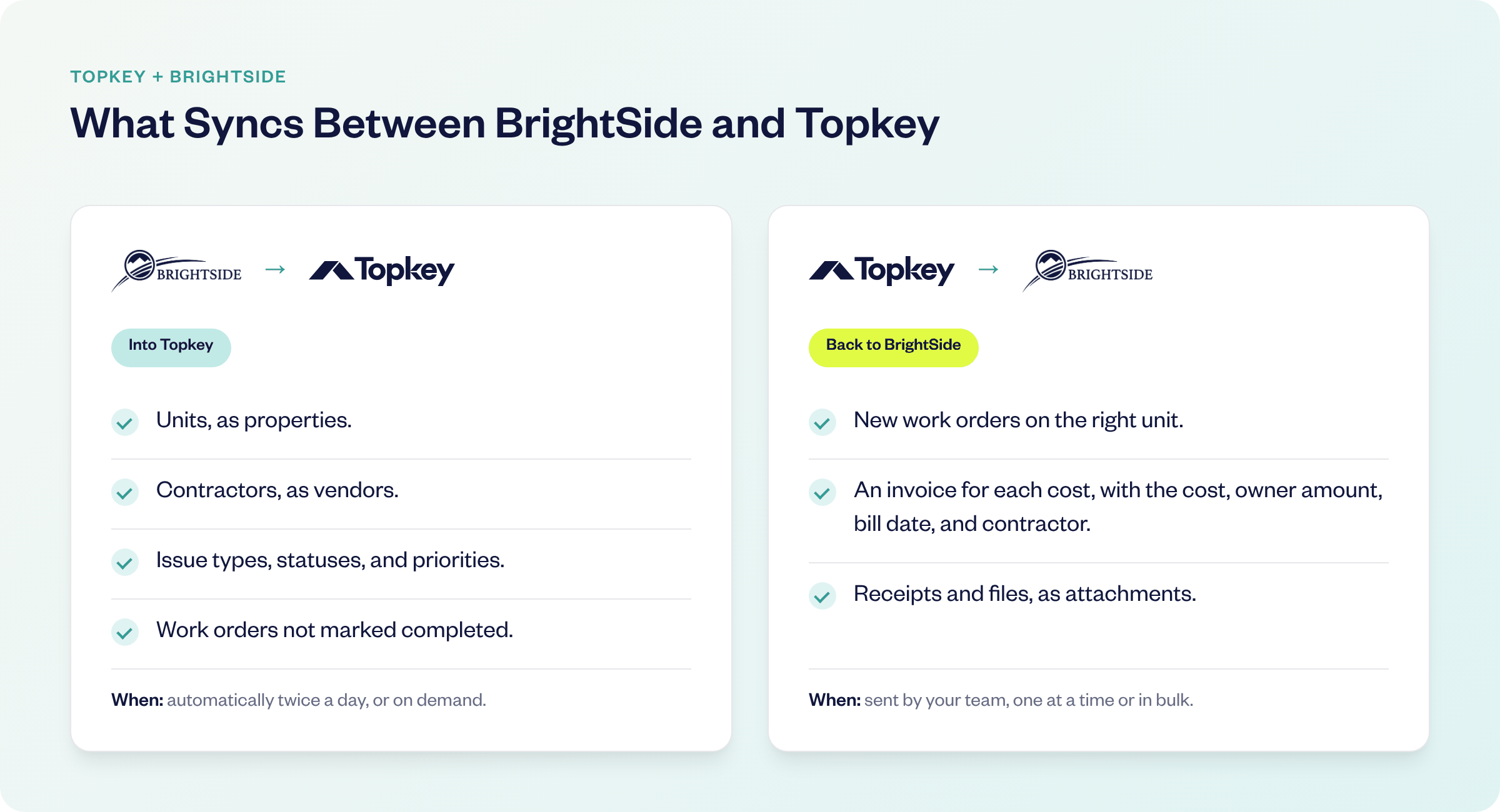
The integration runs in two directions.
BrightSide Units, Contractors, and Work Orders Sync into Topkey
Your BrightSide units come into Topkey as properties, and your contractors come in as vendors, along with your issue types, statuses, and priorities. BrightSide work orders that aren't marked completed sync in too, so new charges can be attached to work your team has logged. That shared list puts each charge on the correct unit and contractor, so the right owner gets billed.
Syncs run automatically twice a day, and you can run one from the integration settings whenever you need it.
Work Orders, Invoices, and Receipts Sync Back to BrightSide
When you send a work order from Topkey, it's created in BrightSide on the right unit. Each cost on it becomes its own invoice on that work order, with the cost, the amount to bill the owner, the bill date, and the contractor. Receipts and other supported files upload to the work order as attachments in the background. It's the same invoice your team would have entered by hand, and it's in BrightSide before month-end instead of after.
One Repair, from Card Swipe to BrightSide Work Order
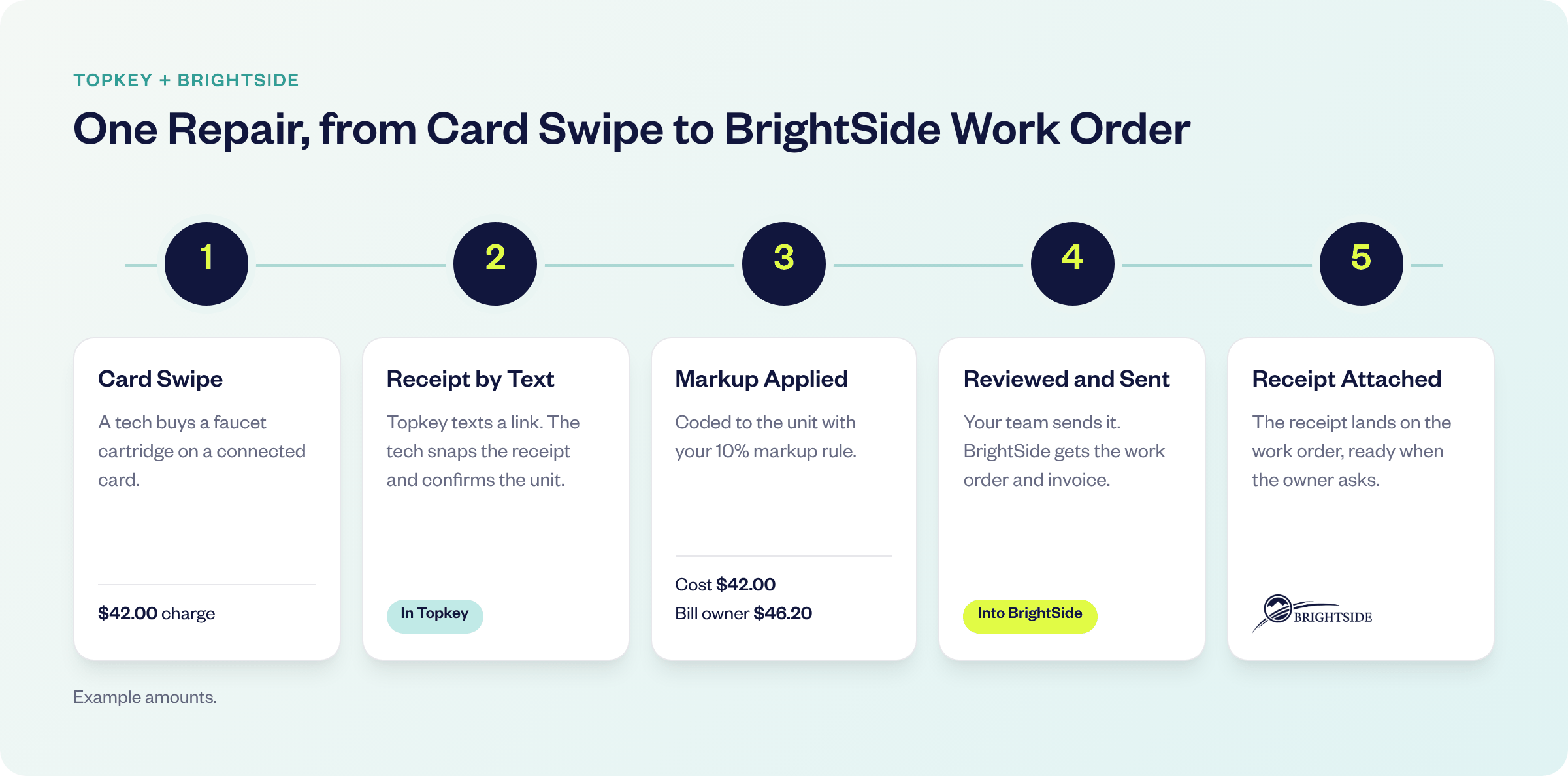
Here's a single repair, start to finish.
Capturing Receipts Right After the Purchase
A tech buys a $42.00 faucet cartridge on a connected card. As soon as the charge comes through, Topkey texts them a link to snap the receipt and confirm the unit. Topkey's AI suggests the unit, account, and GL code, and if a receipt is still missing, Topkey keeps sending reminders until it comes in. The receipt gets captured while it's still in the tech's hand, not rebuilt from memory three weeks later.
Creating BrightSide Work Orders with Markups from Expenses
From that charge, someone on your team picks the BrightSide issue type and priority, reviews the details, and sends it. The markup rules you set once in Topkey are applied before anything leaves Topkey. With a 10% markup, the invoice carries $42.00 as the cost and $46.20 to bill the owner. That $4.20 is the kind of small-repair markup that gets skipped when someone has to do the math by hand.
If the maintenance team already logged that work order in BrightSide, attach the charge to it instead of creating a new one.
An operations coordinator at a 250+ unit vacation rental company measured what this workflow is worth: "Since implementing Topkey, I've saved over 16 hours a month on work orders." That's two full workdays a month back from a single task.
Attaching Receipts to BrightSide Work Orders
Once the work order is sent, the receipt lands on it in BrightSide as an attachment. When an owner asks about a repair charge, whoever answers can open the work order and see exactly what was bought, without digging through an inbox or a card portal.
Built for a Busy Maintenance Season
Sending Work Orders to BrightSide in Bulk
After a weekend of turnovers, select your saved work orders and send them to BrightSide together. Work orders that were sent before are left out of the batch, so nothing posts twice. Monday starts with one review and one send instead of a stack of data entry.
Paying BrightSide Contractors by ACH or Check
Contractor bills go into Topkey against BrightSide units, move through your approval workflows, and get paid in bulk by ACH or check. Because contractors sync from BrightSide, you're paying the same contractor records your maintenance team uses. When an owner questions a repair bill, what you paid the contractor and what you billed the owner trace back to the same records.
Breezeway, BrightSide, and Topkey Together
If your team runs inspections and maintenance in Breezeway, pull completed or selected Breezeway tasks into Topkey with the unit attached. Pair them with their costs, then send eligible ones to BrightSide as work orders with invoice details and available photos. An issue found on an inspection becomes a billable work order without anyone keying it in twice.
Month-End, After
What the Close Looks Like Now
It's the last week of the month again, and the books are about to close. Card statements are open, and so is BrightSide. But the work orders are in place, marked up, with the receipts attached. Nobody is texting the maintenance team about a charge from three weeks ago.
The bookkeeper reviews instead of reconstructs. And when an owner asks about a repair, the answer is already on the work order.
What Catching This Spend Is Worth
Property managers who capture expenses this way see it in their numbers. One 50+ unit property manager saves 15 to 20 hours a week on financial tasks and recovers $2,500 a month in missed owner charges. A 200+ unit company recovered $10,000 to $20,000 in missed owner expenses in its first few months.
The operations manager at that 50+ unit company put it plainly: "We've found thousands of dollars a month in leakage that we just were not billing for. A mixture of materials and labor that just wasn't being caught." Materials and labor are maintenance spend, the kind that's easiest to lose between a card statement and a work order.
Is This a Fit for Your BrightSide Company?
The integration helps most when a few things are true:
- Your maintenance team buys parts and supplies on business cards.
- You bill owners for repairs, often with a markup.
- Someone enters work order invoices in BrightSide by hand before the month closes.
- Owners sometimes ask what a repair charge was for.
If most of those sound like your company, the integration takes that manual entry off your team's plate. If your owners pay contractors directly and you rarely pass repair costs through, it will matter less.
Getting Started with the BrightSide Integration
Connecting BrightSide takes a few steps:
- Get a BrightSide API key with access to units and work orders.
- In Topkey, go to Settings, then Integrations, and enter the key with your BrightSide company subdomain.
- Topkey checks the key and runs the first sync.
- Set your markup rules, connect your cards, and send your first work order.
You won't do it alone. Every Topkey customer gets a dedicated Financial Technology Consultant, not a ticket queue. Yours turns on BrightSide for your account, walks your team through setup, and checks in with you through your first few month-end closes.
Common Questions from BrightSide Users
Does Topkey Replace Anything in BrightSide?
No. BrightSide stays your PMS and the home for reservations, owner statements, and trust and escrow accounting. Topkey handles the spend before it reaches BrightSide, and it syncs to your accounting software too, whether that's QuickBooks Online, Xero, Oracle NetSuite, or Sage Intacct.
Do We Have to Switch Cards?
No. Connect the Visa, Mastercard, or American Express business cards you already use, and keep your rewards.
Can I Change a Work Order After It's Sent?
Yes, in BrightSide. Once Topkey sends a work order, BrightSide is where you update it, close it, or adjust it.
Closing the Month Without the Receipt Chase
Without a connection between your cards and BrightSide, the last week of every month means entering maintenance invoices by hand before you can close the books. With one, next month's work orders could be in BrightSide, marked up, with receipts attached, before anyone opens a card statement.
See the Topkey difference.