
Hospitable handles guest messaging, reviews, calendars across Airbnb, Vrbo and Booking.com, and Owner Statements. It doesn't capture spending in the field, collect receipts or pay vendors. Someone still sorts every card swipe and invoice by property at month-end, usually from memory.
Topkey's Hospitable integration closes that gap. It reads your properties and reservations from Hospitable, so each charge is coded to the right home the moment it happens, with the receipt attached. Topkey pays vendors and owners in bulk and reconciles your payouts, and it never changes anything in your Hospitable account.
Topkey + Hospitable at a Glance
- What it is: a read-only connection between Topkey and Hospitable, set up through Hospitable's own sign-in.
- What Topkey pulls from Hospitable: properties, plus reservations and their host financials once you turn reservation sync on.
- What Topkey sends to Hospitable: nothing. Your Hospitable account stays exactly as you set it up.
- Who it's for: short-term rental property managers on Hospitable who want every charge coded, every receipt captured and a faster month-end.
- What else connects: QuickBooks Online, Xero, Oracle NetSuite, Sage Intacct, Amazon Business and the business cards you already use.
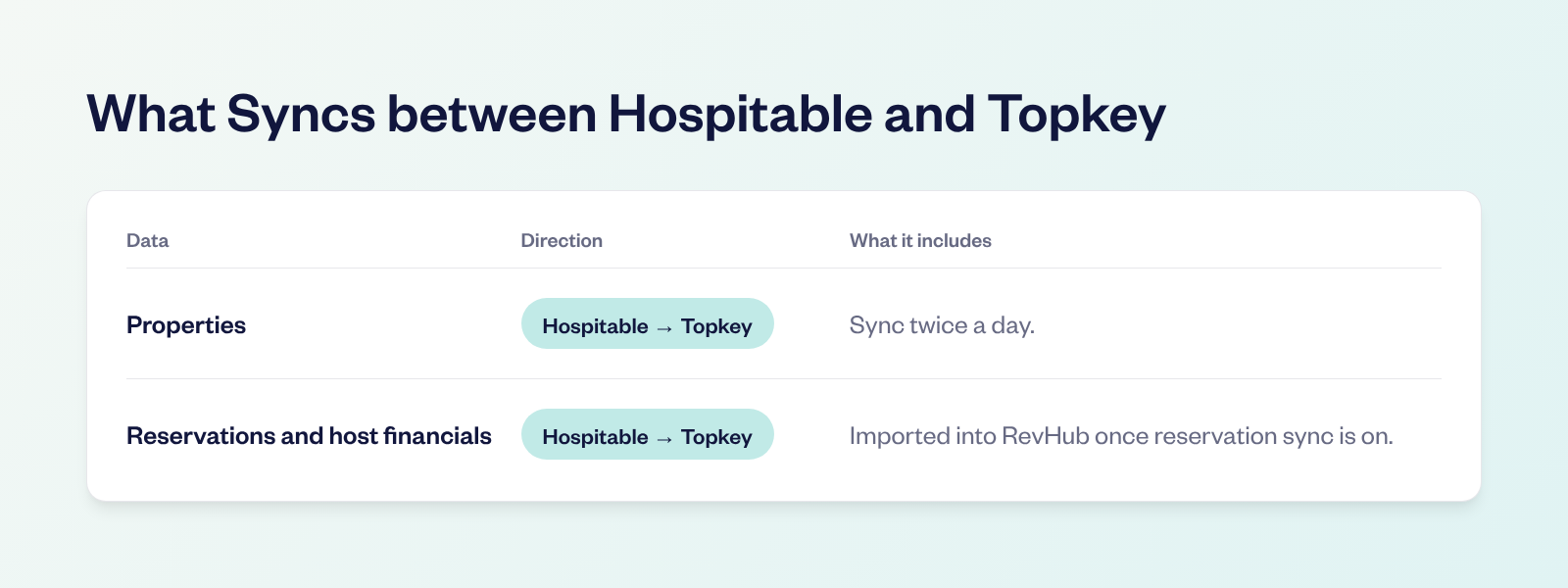
What Syncs between Topkey and Hospitable
Properties sync from Hospitable twice a day. Reservations come in for revenue reconciliation in RevHub once you turn on reservation sync, which is off by default. Nothing flows back to Hospitable.
Why Hospitable Teams Still Lose Time at Month-End
A charge from a hardware store says nothing about which home the light fixtures went to. A cleaner's invoice covers six properties. Before any of it reaches your books or an Owner Statement, someone has to sort it out.
Receipts make it harder. Your field team is turning over homes, not filing paperwork, so receipts sit in trucks and camera rolls until someone asks for them. By then some are gone.
And when charges are sorted weeks later, the ones that belong on an owner's statement are the easiest to miss. Every one of them is cash your company covers.
How the Topkey + Hospitable Integration Works
Capture Every Expense at the Point of Sale
Connect the business cards you already use, or issue Topkey corporate cards. When someone swipes, they get a text with a link to add the receipt, pick the property from your Hospitable list and mark whether the owner pays, right from their phone.
- AI coding: Topkey suggests a GL code for each charge.
- Merchant rules: merchant rules code repeat vendors, like your landscaper or your smart lock subscription, so those charges arrive already coded.
- Amazon Business: Amazon Business orders arrive with the order number and receipt.
Flag Owner Billables for Hospitable Owner Statements
If the owner should pay for it, your team marks it Bill to Owner while the purchase is fresh. Filter by Bill to Owner at month-end and your owner billables are in one list, with receipts, ready to add as adjustments on your Hospitable Owner Statements. No one rebuilds the list from card statements and memory.
Approve Larger Charges before They're Paid
With approval workflows, a big repair invoice gets a manager's sign-off inside Topkey before it's paid. The approval lives with the expense, not in a text thread.
Pay Vendors in Bulk
Bill Pay reads vendor invoices, codes them to the right Hospitable property and GL account, and routes them through approvals. Pay vendors in bulk by ACH or check, so the invoice your team already coded is the one that gets paid. No one keys it into a bank portal or Venmo a second time.
Pay Every Owner in One Batch
Owner payouts don't have to mean one transfer at a time. Import owner payout amounts from a CSV or create them in bulk, send them through approval, then select the requests that are Ready To Pay and pay them together by ACH. Owners add or update their bank details through a secure link, so a failed payment is a quick fix.
Revenue Reconciliation for Hospitable Users
Month-end also means proving every reservation was paid. Turn on reservation sync and RevHub brings in your Hospitable reservations with their host financials: accommodation, guest and host fees, discounts, taxes and the expected payout.
- Airbnb: connect Airbnb directly and RevHub splits lump-sum payouts into individual reservations.
- Stripe: Stripe payouts are matched to the reservations behind them.
- Vrbo and Booking.com: upload their payout reports and RevHub matches them too.
- Exceptions: underpayments, overpayments and unmatched revenue are flagged during the month, not discovered at close.
Owner Statements in Hospitable
Hospitable builds and sends your Owner Statements. Topkey makes sure the expense side is ready before you do. Owner billables sit in one list with their receipts, and supply charges come grouped by owner or property, so adding them to each statement is a review, not a hunt.
If you'd rather draft statements in Topkey, RevHub can build owner statements from your Hospitable reservations and Topkey expenses. It's set up per account, so ask your customer success manager.
Inventory That Reaches the Owner
A case of towels or a turnover kit is easy to forget by month-end. With Inventory Management, your team checks supplies out to a Hospitable property from the Topkey storefront, and each checkout keeps its cost and the price the owner should pay, including any markup rules you've set.
At month-end, the Inventory Charges report groups those checkouts by owner or property and exports them to CSV, ready to add as adjustments on each Hospitable Owner Statement alongside your other owner billables.
Accounting Software and the Rest of Your Stack
- Accounting software: coded charges and invoices sync to QuickBooks Online, Xero, Oracle NetSuite or Sage Intacct, with the property and receipt attached. If you also use Hospitable's own QuickBooks sync, decide which system posts owner charges so nothing is recorded twice.
- Cards: keep the cards and rewards you already have, and add receipt capture and property coding on top.
Results Hospitable Customers Are Seeing
Alex McKenzie, CEO and Founder of Top Shelf Vacation Rentals, describes the shift in reconciliation. "Reconciliation used to take 2-3 days. With Topkey, I review and approve everything in minutes."
The work is still there, but it happens at the moment of purchase, when the person who bought the item answers a text. For a Hospitable team, that means the month-end pile is already sorted before anyone opens an Owner Statement.
How to Set Up the Integration
- Connect Hospitable. In Topkey, go to Settings, then Integrations, and click the Hospitable tile. Sign in to Hospitable and approve access.
- Check your properties. Make sure the list matches Hospitable before anyone codes a charge.
- Turn on reservation sync if you use RevHub. Switch on Automatically sync reservations twice per day. It's off by default, and you can skip it if you only need expense coding.
- Connect your cards and bank accounts. Connect the cards you already use or issue Topkey corporate cards, and turn on receipt reminders.
- Code a test charge. Assign one charge to a property, attach the receipt and sync it to your accounting software.
Frequently Asked Questions
What Does the Topkey Hospitable Integration Do?
It connects Topkey to Hospitable through Hospitable's own sign-in and reads your properties and reservations. The integration is read-only, so nothing in your Hospitable account changes. Topkey adds corporate cards, Bill Pay, owner payouts, receipt capture, revenue reconciliation and accounting sync to the spending side of your business.
What Is the Best Expense Management Software for Hospitable?
If you want every card charge and vendor invoice coded to your Hospitable properties, Topkey is built for that job. It combines corporate cards, receipt capture by text, AI coding, Bill Pay, approval workflows and merchant rules, and syncs coded spending to QuickBooks Online, Xero, Oracle NetSuite or Sage Intacct.
How Do I Track Owner Billables for Hospitable Owner Statements?
Mark any charge or invoice the owner should pay as Bill to Owner. At month-end, filter by Bill to Owner and you have one list with receipts, ready to add as adjustments on each Hospitable Owner Statement.
Can Topkey Reconcile Hospitable Reservations and Payouts?
Yes. Turn on Automatically sync reservations twice per day and RevHub brings in your Hospitable reservations with their host financials. It matches them to Airbnb, Stripe, Vrbo and Booking.com payouts and the deposits that land in your bank, and flags underpayments, overpayments and unmatched revenue.
How Do I Bill Owners for Supplies and Inventory?
With Topkey's Inventory Management, your team checks supplies out to a Hospitable property and each checkout keeps its cost and the owner's price. The Inventory Charges report groups them by owner or property and exports to CSV for your Owner Statements.
Do I Have to Switch Credit Cards to Use Topkey with Hospitable?
No. Connect the business cards you already use and keep your rewards, or issue Topkey corporate cards. Either way, each charge gets a receipt request by text and a Hospitable property.
Your Back Office Shouldn't Be the Bottleneck
Hospitable runs your guest operations and Owner Statements. Topkey runs the spending and the payouts around them, so charges are coded, receipts are attached and your books stay current as you add homes.
Want to go further? See how the QuickBooks Online integration keeps your books current, and set up merchant rules so recurring charges arrive already coded.
See the Topkey difference.