
Hostaway runs the guest side of a vacation rental business well: listings, channels, reservations, messaging and owner statements. What it doesn't do is capture the money your team spends in the field, pay your vendors or match lump-sum OTA payouts to the reservations inside them. That work usually lands on a bookkeeper with a spreadsheet at month-end.
Topkey's Hostaway integration connects your cards, bills, bank accounts and payouts to Hostaway. Every expense is tagged to a listing with its receipt, then sent to Hostaway as an expense with your markup already applied. Vendors get paid in bulk, and revenue reconciliation matches every payout to its reservations.
This guide covers what the integration does, how it works day to day and how to connect it.
Topkey + Hostaway at a Glance
- What it is: a direct API connection between Topkey, the financial operations platform built for vacation rental property managers, and Hostaway.
- What syncs from Hostaway: listings and reservations.
- What Topkey sends to Hostaway: expenses, each with the amount, vendor, description and a link to the receipt.
- Who it's for: Hostaway customers who want to stop entering expenses by hand, stop missing owner billables and close the month faster.
- What else connects: Breezeway, QuickBooks Online, Xero, Sage Intacct, Oracle NetSuite, Amazon Business and the business cards you already use.
Why Hostaway Teams Still Lose Time at Month-End
Owner statements in Hostaway are only as complete as the expenses your team gets into Hostaway. For most companies, that part is still manual.
A cleaner restocks paper towels at Costco. A handyman buys a faucet at Lowe's for one home and a smoke detector for another. A landscaper sends one invoice for twelve properties. Someone has to find each receipt, work out which listing it belongs to, decide whether the owner pays, add the markup and type it all into Hostaway.
The cost shows up twice. Your finance team loses days to data entry. And any expense that never makes it into Hostaway never makes it onto an owner statement. That's cash leakage: money your company spent on an owner's behalf and never got back.
How the Topkey + Hostaway Integration Works
Capture Every Expense Where It Happens
Connect the business cards you already use, or issue Topkey corporate cards. Charges show up in Topkey as they happen.
- Cardholders get a text with a link to the charge, where they add the receipt, pick the listing and choose who pays, right from their phone.
- Topkey's AI suggests the GL code for each charge, and merchant rules code repeat merchants automatically.
- Split one receipt across as many listings as you need.
- Amazon Business orders match to their card charges and bring in the receipt, with line items split out.
- Bank transactions can be coded and sent to Hostaway too, so owner billables paid by ACH or check don't slip through.
Send Expenses to Hostaway
When an expense is ready, send it to Hostaway in a click, or select many and send them together. Each one posts to the right listing as an expense with the amount, vendor, description and a link to the receipt, so owners and reviewers can see what was spent and why.
Topkey checks for records it already sent, so correcting and resending an expense updates it instead of creating a duplicate. Your Hostaway owner statement process stays the same. The expenses simply arrive complete.
Apply Markups Without the Math
Set markup rules by listing, vendor or category, as a percentage or a flat amount. Topkey applies the markup before the expense reaches Hostaway and sends the marked-up amount, so the owner charge is right the first time.
Pay Vendors in Bulk
Topkey Bill Pay reads each invoice, suggests a listing and GL code for every line and splits one invoice across as many listings as it covers. Bills route through your approval workflows, then you pay vendors in bulk by ACH, check, virtual card or wire.
- Paid bills sync to your accounting software with their invoices attached.
- Owner-billable lines post to Hostaway as expenses on the right listing.
Revenue Reconciliation for Hostaway Users
Expenses are half of month-end. The other half is proving every dollar of booking revenue arrived. Airbnb, Vrbo and Booking.com pay out in lump sums that cover many reservations, net of fees.
Topkey Revenue Reconciliation matches it all:
- Reservations sync from Hostaway twice a day.
- Airbnb connects directly, so lump-sum payouts split into individual reservations without exports.
- Stripe connects to your account for direct bookings.
- Booking.com, Vrbo and Marriott Homes payouts match from uploaded reports.
- Reservations that are underpaid, overpaid or not paid get flagged during the month, so you catch a short payout before an owner does.
Owner Statements and Trust Accounting
Many Hostaway customers keep running owner statements in Hostaway, and Topkey feeds them complete, receipt-backed expenses. Teams that want more control can use Topkey Owner Statements and Topkey Trust Accounting with Hostaway.
- Owner statements draft from your Hostaway reservations and the owner expenses in Topkey. Each owner's contract sets the commission on every stay. Statements move from draft to review to finalized before owners see them, and you can pay owners in bulk and email statements from the same list.
- Trust accounting keeps a double-entry trust ledger by account and month that separates owner funds, advance deposits, management fees and taxes. Payouts are matched daily, and a period only closes once reconciliation and ledger checks pass.
Topkey provides software to support trust accounting workflows. Customers remain responsible for compliance with applicable trust accounting and state licensing laws.
Inventory That Reaches the Owner
Linens, cleaning supplies and guest amenities are easy owner billables to miss. With Topkey Inventory Management, your team checks supplies out by listing, or uses a kit like a turnover kit, and Topkey prices each item for the owner. From the Charges Report, turn those charges into a work order and send it to Hostaway as an expense.
Breezeway, Accounting Software and the Rest of Your Stack
- Breezeway. Pull completed Breezeway tasks into Topkey, attach the card charges or bills behind them and send the costs to Hostaway as expenses.
- Accounting software. Topkey syncs the same coded expenses and bills to QuickBooks Online, Xero, Sage Intacct or Oracle NetSuite, with listing-level coding for per-property P&Ls.
- Your cards. Connect the cards you already use and keep your rewards. Topkey adds receipt capture and listing tagging on top.
Results Hostaway Customers Are Seeing
- Leisr Stays (110 units across North Carolina, South Carolina and Virginia) saves 50+ hours a month, cut $36,000 a year in costs and closes the books three days faster. "I can't imagine if we didn't have Topkey at this point," says Ethan Layer, Managing Partner. "It would have been a very large opportunity cost missed."
- HostWise (51 to 100 units, Pittsburgh) adds a new property in about a minute instead of 30. "Having a single system that allows you to see and manage your banking, expenses, and bill pay is critical for rapid growth," says Chad Wise, Founder.
Step-by-Step Setup Instructions
Follow these steps to connect your Hostaway account to Topkey.
1. Log in to Topkey
Login to your Topkey account.
2. Navigate to Integrations
Go to Settings → Connections → Integrations
3. Find and Select Hostaway
Scroll down to Hostaway in the integrations list and click Connect.

Find Your Hostaway Credentials on Hostaway Dashboard
You need to find your Account ID and API key from the Hostaway dashboard:
- Go to the Hostaway Dashboard.
- Click on 'Marketplace' within the dashboard, then search for the relevant partner and click on the 'Connect/Configure' button available there.
- This will expand the partner box and you can click on 'Connect' again to start generating the Keys.
- Then you can click 'Create' to generate the API Key.
- The new credentials will then be presented on the screen. Please make sure to copy and save the API Key safely as it will be visible only once.
- Once you have collected the Account ID and API Key from Hostaway, you can enter them into your Topkey account on the relevant page and click 'Save'.
4. Enter Hostaway Credentials
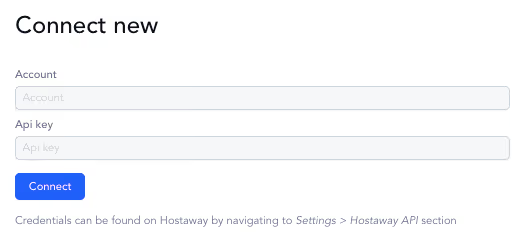
Back in Topkey, you'll be prompted to enter (find these by logging into your Hostaway account and navigating to Settings → Hostaway API):
- Your Hostaway Account ID
- Your Hostaway API Key
5. Complete the Connection
Log in to your Hostaway account when prompted to finalize the integration.
6. You’re Connected!
Once connected, you can sync properties and send expenses directly from Topkey to Hostaway.
What Syncs Between Topkey and Hostaway
| Data | Direction | How it works |
|---|---|---|
| Listings | Hostaway to Topkey | Synced automatically, using the same listing names as Hostaway, so every expense ties to the right unit. |
| Expenses | Topkey to Hostaway | Card charges, bills and work orders post to the listing as expenses, with receipt, vendor and markup. |
| Reservations | Hostaway to Topkey | Reservations sync twice a day and feed revenue reconciliation and Topkey Owner Statements. |
Support
If you have questions or run into issues email: support@topkey.io or reach out to your dedicated Customer Success Manager.
Frequently Asked Questions
What does the Topkey Hostaway integration do?
It connects your cards, bills, bank accounts and payouts to Hostaway. Topkey captures each expense with its receipt and listing, then sends it to Hostaway as an expense with your markup applied. It also pays vendors in bulk and reconciles OTA payouts to Hostaway reservations.
What does Topkey send to Hostaway?
Expenses. Card charges, bills, bank transactions and inventory work orders all post to the right Hostaway listing as expenses, with the amount, vendor, description and a link to the receipt.
Do markups carry into Hostaway owner statements?
Yes. Topkey applies your markup rules before the expense is sent and posts the marked-up amount, so Hostaway's owner statements include it without anyone redoing the math.
Does Topkey replace Hostaway owner statements?
No. You can keep running owner statements in Hostaway, and Topkey makes sure every billable expense arrives complete and receipted. If you'd rather run statements and trust accounting in Topkey, both work with Hostaway.
Can Topkey reconcile Airbnb payouts for Hostaway users?
Yes. Topkey syncs reservations from Hostaway, splits Airbnb payouts into reservations through a direct connection, connects to Stripe and matches Booking.com, Vrbo and Marriott Homes payouts from uploaded reports. Anything underpaid, overpaid or not paid is flagged.
Does Topkey work with Breezeway and Hostaway together?
Yes. Completed Breezeway tasks come into Topkey, where you attach the receipts or charges behind them and send the costs to Hostaway as expenses.
Do I have to switch credit cards to use Topkey with Hostaway?
No. Connect the business cards you already use and keep your rewards, or issue Topkey corporate cards.
Your Back Office Shouldn't Be the Bottleneck
Every hour your team spends typing expenses into Hostaway is an hour not spent on owners, guests or growth. Every receipt that never reaches Hostaway is money your company spent and never billed back.
Topkey + Hostaway closes that gap. More than 350 vacation rental property managers use Topkey to capture every expense, bill every owner and close the month in hours instead of days.
See how Topkey and Hostaway would work together for your portfolio. Book a demo.
---
Topkey is a financial technology company and is not an FDIC-insured bank. Banking services provided by Thread Bank, Member FDIC.
See the Topkey difference.